
How to make useState in React not suck
A lot of engineers use React's useState incorrectly, let's address it
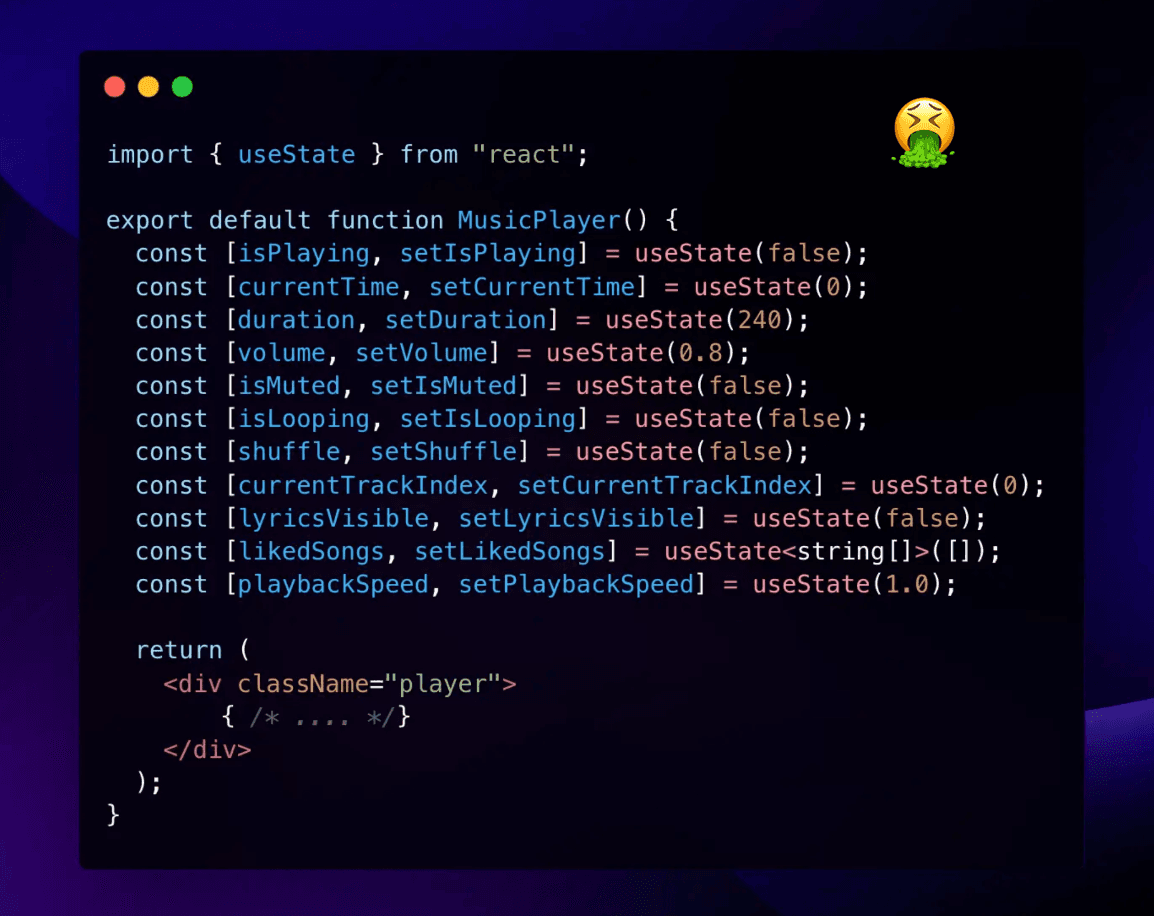
Hey nerds. Look at the cover. You see that? Stop that.
On this Page
We all know useState is one of React's most important hooks. You manage pretty much all of your
component's state with it. At its core, it's just a plain old JavaScript object. Look,
here's a simple state:
1const [x, setX] = useState(0);Now, in POJO form:
1const state = {2 x: 0,3};Simple enough!
But then, this is where the problems begin. A lot of engineers, especially those onboarding
to a web development era led by generative AI tools, start using useState incorrectly.
In this random thought, we'll be going over a few common patterns to write state management like a pro.
Grouping related state
Think back to the POJO example. You have an x and a setter, setX.
Now, let's say you want to add a y and a setter, setY.
You might be tempted to do this:
1const [x, setX] = useState(0);2const [y, setY] = useState(0);But this is bad. Why?
Well, let's say you want to update both x and y at the same time. You'll have to do this:
1setX(x + 1);2setY(y + 1);And that's just not clean.
What you should do instead, is group related state together.
1const [state, setState] = useState({2 x: 0,3 y: 0,4});Now, you can update both x and y at the same time:
1setState({2 x: state.x + 1,3 y: state.y + 1,4});Super chill, right? Let's go deeper.
You can't update only one field in the state object without using the spread operator (copying the other fields). If you did
setState({ x: state.x + 1 }), you'd lose the y value. So keep that in mind.
The useReducer hook
useReducer is a hook that is used to make state management more predictable.
It's a bit more complex than useState, but knowing how to use it is worth it, especially for state that has
complex transformations.
Let's look at a fun example I think will make this hook's usefulness click.
To start: the bad
1import { useState } from "react";2
3export default function ShoppingCart() {4  const [items, setItems] = useState<{ id: string; price: number; qty: number }[]>([]);5  const [subtotal, setSubtotal] = useState(0);6  const [discount, setDiscount] = useState(0);7  const [taxRate, setTaxRate] = useState(0.08);8  const [checkedOut, setCheckedOut] = useState(false);9
10  const addItem = (item: { id: string; price: number; qty: number }) => {11    const newItems = [...items, item];12    setItems(newItems);13    const newSubtotal = newItems.reduce((sum, { price, qty }) => sum + price * qty, 0);14    setSubtotal(newSubtotal);15    // What if we forget to update subtotal here?16    // The state becomes inconsistent. Boom, our first problem.17    // And we're only one function in...18  };19
20  const removeItem = (id: string) => {21    const newItems = items.filter(item => item.id !== id);22    setItems(newItems);23    // Forgot to update subtotal this time!24    // And we need to recalculate discount too...25  };26
27  const applyDiscount = (percentage: number) => {28    setDiscount(percentage);29    // Need to update subtotal with new discount30    // But what if items change after this?31    // State is getting out of sync...you seein the problems?32  };33
34  return (35    <section>36      {/* ... */}37    </section>38  );39}
As we see, yikes. Multiple related pieces of state are floating around with no guarantee they stay in sync.
This is a simplified example. In a real app, you'd have more state and more
complex transformations. That's where it gets even more nasty to exclusively use useState.
The good
Let's refactor using useReducer so every transformation lives in one place.
1import { useReducer } from "react";2
3type CartItem = { id: string; price: number; qty: number };4
5interface State {6  items: CartItem[];7  subtotal: number;8  discount: number;9  taxRate: number;10  checkedOut: boolean;11}12
13type Action =14  | { type: "addItem"; payload: CartItem }15  | { type: "removeItem"; payload: string }16  | { type: "discount"; payload: number }17  | { type: "checkout" }18  | { type: "reset" };19
20const initialState: State = {21  items: [],22  subtotal: 0,23  discount: 0,24  taxRate: 0.08,25  checkedOut: false,26};27
28const calcSubtotal = (items: CartItem[]) =>29  items.reduce((sum, { price, qty }) => sum + price * qty, 0);30
31function reducer(state: State, action: Action): State {32  switch (action.type) {33    case "addItem": {34      const items = [...state.items, action.payload];35      return { ...state, items, subtotal: calcSubtotal(items) };36    }37    case "removeItem": {38      const items = state.items.filter(i => i.id !== action.payload);39      return { ...state, items, subtotal: calcSubtotal(items) };40    }41    case "discount":42      return { ...state, discount: action.payload };43    case "checkout":44      return { ...state, checkedOut: true };45    case "reset":46      return initialState;47    default:48      return state;49  }50}
Now updating state is a single-line affair:
1dispatch({ type: "addItem", payload: { id: "abc", price: 20, qty: 2 } });2dispatch({ type: "discount", payload: 5 });3dispatch({ type: "checkout" });And here's the component - tidy and predictable:
1export default function ShoppingCart() {2  const [state, dispatch] = useReducer(reducer, initialState);3  const total = state.subtotal - state.discount + state.subtotal * state.taxRate;4
5  const addItem = (item: CartItem) => dispatch({ type: "addItem", payload: item });6  const removeItem = (id: string) => dispatch({ type: "removeItem", payload: id });7  const applyDiscount = (percentage: number) => dispatch({ type: "discount", payload: percentage });8  const checkout = () => dispatch({ type: "checkout" });9  const resetCart = () => dispatch({ type: "reset" });10
11  return (12    <section>13      {/* ... */}14    </section>15  );16}
Would you look at that. Beautiful!
I'm not saying you should use useReducer for every state update. Far from it. But,
when you have state that needs to be transformed in a certain way, it's a godsend.
And, if you're using Redux, you're already using useReducer under the hood.
Tips and tricks
I wanted to add some rapid fire, real bugs I've fixed in client code, shown as before/after diffs so you can keep the 🟢 and yeet the 🔴 far as fuck. Please, take this with you and use it as a reference!
1. Merge variables that never split up
1- const [width,  setWidth]  = useState(0);2- const [height, setHeight] = useState(0);3
4+ type Size = { w: number; h: number };5+ const [size, setSize] = useState<Size>({ w: 0, h: 0 });
2. Design away "impossible" states
1- const [isFetching, setIsFetching] = useState(false);2- const [data, setData] = useState<User[] | null>(null);3- const [error, setError] = useState<string | null>(null);4
5+ type FetchState =6+   | { status: "idle" }7+   | { status: "loading" }8+   | { status: "success"; data: User[] }9+   | { status: "error";  msg: string };10+11+ const [fetch, setFetch] = useState<FetchState>({ status: "idle" });
3. Keep a pointer, not the entire object
1- const [selectedMovie, setSelectedMovie] = useState<Movie | null>(null);2
3+ const [movieId, setMovieId] = useState<string | null>(null);4+ const selectedMovie = useMemo(5+   () => movies.find(m => m.id === movieId) ?? null,6+   [movies, movieId]7+ );
4. Let derived data be derived
1- const [cartItems, setCartItems] = useState<CartItem[]>([]);2- const [total, setTotal] = useState(0);3-4- function addItem(item: CartItem) {5-   const next = [...cartItems, item];6-   setCartItems(next);7-   setTotal(next.reduce((s, i) => s + i.price * i.qty, 0));8- }9
10+ const [cartItems, setCartItems] = useState<CartItem[]>([]);11+12+ const total = useMemo(13+   () => cartItems.reduce((s, i) => s + i.price * i.qty, 0),14+   [cartItems]15+ );16+17+ const addItem = (item: CartItem) =>18+   setCartItems(prev => [...prev, item]);
5. Avoid redundant state
1- const [query, setQuery] = useState("");2- const [filtered, setFiltered] = useState<Product[]>([]);3-4- useEffect(() => {5-   setFiltered(products.filter(p => p.name.includes(query)));6- }, [query, products]);7
8+ const [query, setQuery] = useState("");9+ const filtered = useMemo(10+   () => products.filter(p => p.name.includes(query)),11+   [products, query]12+ );
6. Don't adopt props, use them
1function Modal({ isOpen }: { isOpen: boolean }) {2- const [open] = useState(isOpen); // ❌ frozen zombie value3- return open ? <div>👋</div> : null;4+ return isOpen ? <div>👋</div> : null; // ✅ breathe, little prop5}7. Flatten your deeply nested state
1- const [state, setState] = useState({2-   org: {3-     team: {4-       member: {5-         profile: {6-           settings: { theme: "dark" }7-         }8-       }9-     }10-   }11- });12-13- setState(prev => ({14-   ...prev,15-   org: {16-     ...prev.org,17-     team: {18-       ...prev.org.team,19-       member: {20-         ...prev.org.team.member,21-         profile: {22-           ...prev.org.team.member.profile,23-           settings: { theme: "light" }24-         }25-       }26-     }27-   }28- }));29
30+ type MemberSettings = { id: string; theme: "dark" | "light" };31+32+ const [settingsById, setSettingsById] = useState<33+ Record<string, MemberSettings>34+ >({});35+36+ setSettingsById(prev => ({37+ ...prev,38+ [memberId]: { ...prev[memberId], theme: "light" }39+ }));If a single update makes you mutter "this can't be right," flatten first, refactor later.
If there's one thing you take away from this random thought, it should be this:
State is not easy. It's hard to get right. But with a few best practices, you can make it easier on yourself to build better web applications, faster. No AI tool is going to save you from yourself.