If you build your own PaaS, you don't need SaaS

I built a self-hosted deployment platform

35 mins read

February. Naturally, this month is always lovely for me. And I loveeee deploying things. Pi-hole, my home server, random (vercel/netlify/render/fly) projects, shit, even new versions of this verysite.

We've all had the cannon event. You open a dashboard one day, see a $50/mo bill for a pet project, and think "hold on. What am I even paying for?" A CDN? A build queue? An S3 bucket with a nice UI? And the most crushing question of all. "Do I even own any of this?"

That's where pdploy came from. Not some EPIC VISION of disrupting the PaaS industry. Let's be real, no one's doing that over a weekend. I'd been chewing on this for a while, and with the cost of shipping so low now (thanks, AI), why the heck not? But before the weird nerd details, you need to understand why I built it.

The enshittification of everything

In the fall of 2022, Heroku killed their free tier.

After a decade of "just git push and it works," Salesforce announced they were "sunsetting free product plans" starting November 28th, 2022. Dynos from $7/month, Postgres at $9. The thing that taught a generation of developers how to deploy became a shell of itself. A year later, Replit followed suit.

Their Fall 2023 post pointed to "more powerful infrastructure," "crypto mining abuse," and users burning "thousands of dollars of bandwidth." The free plan survived, but barely. (They did outline some fair reasons.)

Sound familiar? Cory Doctorow gave it a name. Enshittification . Platforms start amazing for users. Permissive free tiers, almost too good to be true. Then they extract value from users to attract business; then from everyone to maximize profit. Same playbook everywhere, from Heroku to Netflix going from "love is sharing a password" to cracking down on sharing.

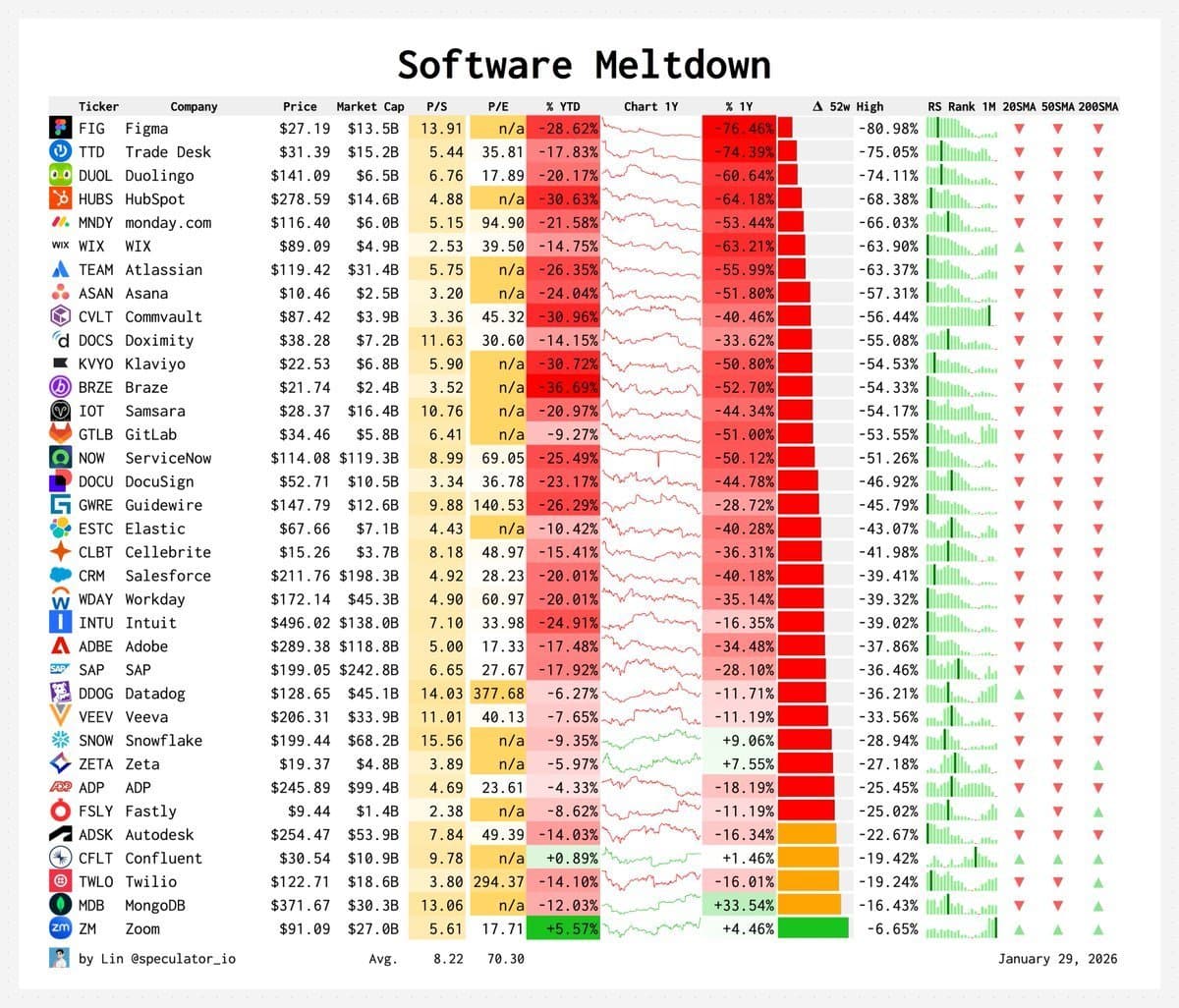
However, it's not all doom and gloom. People are starting to notice. And if the SaaS stocks are any indication, investors are getting a little nervous.

SaaS stock prices meltdown

Vercel and Netlify haven't gone full Heroku yet, but the writing's on the wall. Vercel's pricing is opaque at best, predatory at worst. Per team member, per edge function, per ISR revalidation, per bandwidth spike on launch day. People rent compute at a 10x markup and call it "developer experience." For most of us, it doesn't have to be that way.

I don't want to be dramatic. These are businesses; they need to make money. But there's a fundamental tension between "we make deploying easy" and "we charge you per request." That tension resolves one way, over and over.

So I thought, what if I just... built the thing? How hard could a deployment platform actually be? Spoiler: harder than I expected. But not as hard as you'd think.

PaaS 101

Every PaaS (think Vercel, Netlify, Heroku) is really just a handful of core pieces I can apply to my own or even your very own infrastructure.

  1. Web server → Handle deploy requests with Bun.
  2. Build queue → Ensure builds happen one at a time, with Redis.
  3. Build worker → Clone repos and build them in Docker containers.
  4. Object storage → Store build artifacts (HTML, JS, etc.) in S3.
  5. Preview server → Serve each deploy on its own shareable URL via Nginx.
  6. Authentication → Secure access to deploys using Better Auth.
  7. Database → Track users, projects, and deploys with Drizzle.

Everything else, like the web dashboards, GitHub integrations, log streaming, pretty graphs, is just nice to have on top. Pdploy implements a lot of it. On a single VPS. With a single runtime.

It's all framework agnostic too, so you can make your build queue use RabbitMQ, Kafka, or even a custom queue you build yourself. Same with object storage, like S3, R2, dare I say MinIO?

Choosing violence in a tech stack (Bun)

I went all-in on Bun. Not Bun as "a faster npm install." Bun as the entire runtime. Server, build system, worker processes, package manager, and test runner. For me, Bun 1.3 was the tipping point. Before that release, using Bun for anything serious felt like a serious bet on them supporting the ecosystem. In 2026? Post-anthropic acquisition, their feature set looks genuinely compelling:

  • Bun.serve() with built-in routing and streaming responses
  • Native S3 client (S3Client from "bun"), no AWS SDK needed
  • Built-in Redis client that benchmarks significantly faster than ioredis
  • Bun.build() for client-side asset bundling at startup
  • Bun.TOML.parse() for reading TOML files (used for pyproject.toml detection)
  • Bun.file() for zero-copy file I/O
  • Bun.spawn() for subprocess management
  • Bun.which() for finding executables on PATH

In a vaccum, 90% of this doesn't matter to people, but for us, it's a big deal.

Honestly though the thing that really sold me was the S3 client. Pdploy stores every build artifact in Garage - an S3-compatible object store built by the Deuxfleurs collective. In a Node.js world, that means installing @aws-sdk/client-s3, wrestling with the 47 packages it drags in, dealing with the SDK's baroque API, and using the AWS UI. In Bun:

1import { S3Client } from "bun";
2
3const client = new S3Client({
4 endpoint: config.s3.endpoint,
5 region: config.s3.region,
6 bucket: config.s3.bucket,
7 accessKeyId: config.s3.accessKeyId,
8 secretAccessKey: config.s3.secretAccessKey,
9 virtualHostedStyle: false
10});
11
12const file = client.file("artifacts/static/pdploy/index.html");
13await file.write(data, { type: "text/html" });
14const stream = client.file(key).stream();
15const result = await client.list({ prefix: "artifacts/", maxKeys: 1000 });

That's it. No new GetObjectCommand(). No await client.send(). No importing from 6 different subpackages. It's easy peasy lemon squeezy.

The built-in Redis situation is similar. Bun's Redis client is a first-class citizen:

1const client = new Bun.RedisClient(config.redis.url);
2await client.send("XADD", [streamKey, "*", "deploymentId", id]);

No ioredis. No redis package. No connection pooling library. Just raw Redis commands over a fast connection. And critically for Pdploy, it even supports EVAL for one off Lua scripts, which powers the entire concurrency control system (more on that later, was fun to learn about).

Note

I did a small aside and benchmarked Bun's Redis client against ioredis. I found that for the XADD/XREADGROUP workload Pdploy uses, Bun was roughly 2-3x faster in throughput. Not that it matters too much at Pdploy's scale, but it's nice to know I'm not leaving performance on the table.

Because of everything aforementioned, the package.json is refreshingly clean. The total dependency list:

1{
2 "dependencies": {
3 "better-auth": "^1.2.8",
4 "dockerode": "^4.0.7",
5 "dotenv": "^16.5.0",
6 "drizzle-orm": "^0.44.2",
7 "postgres": "^3.4.5",
8 "react": "^19.1.0",
9 "react-dom": "^19.1.0"
10 }
11}

For a full deployment platform with auth, database, container orchestration, and SSR. Compare that to a typical Next.js node_modules? Yeah, let's weep.

The entrypoint

The entire application boots from src/index.ts:

1import { config } from "./config";
2import { setServer, setStartedAt } from "./appContext";
3import { buildClient } from "./client/build";
4import { json } from "./http/helpers";
5import { router } from "./router";
6import { checkStorageConnectivity, isStorageConfigured } from "./storage";
7
8setStartedAt(Date.now());
9
10const start = async () => {
11 const buildResult = await buildClient();
12 if (buildResult.skipped) {
13 console.log("Skipping client asset build (SKIP_CLIENT_BUILD enabled).");
14 } else if (!buildResult.success) {
15 console.warn("Client assets may be missing; /assets/* will 404.");
16 }
17
18 const server = Bun.serve({
19 port: config.port,
20 hostname: config.hostname,
21 development: config.env !== "production",
22 fetch: router,
23 error(error) {
24 console.error(error);
25 return json({ error: "Internal Server Error" }, { status: 500 });
26 }
27 });
28
29 setServer(server);
30 console.log(`API server at http://${server.hostname}:${server.port}`);
31
32 if (isStorageConfigured()) {
33 checkStorageConnectivity().then(({ ok, message }) => {
34 if (!ok && message) console.error(message);
35 });
36 }
37};
38
39start().catch((error) => {
40 console.error("Server failed to start:", error);
41 process.exit(1);
42});

On boot, Pdploy runs Bun.build() to bundle the client-side React assets (CSS, JS) into /dist/client. Then it starts the HTTP server. Then it background-checks S3 connectivity. That's the whole lifecycle.

The appContext.ts module holds global singletons (the Bun.Server reference and the boot timestamp) so other parts of the codebase (like the health endpoint) can read server state without circular imports.

The config layer

Every environment variable gets parsed and normalized in src/config.ts. It's one of those modules that looks boring but saves hours of debugging:

1export const config = {
2 env,
3 hostname,
4 port: parsePort(rawEnv.PORT, 3000),
5 devDomain: normalizeDomain(rawEnv.DEV_DOMAIN, "localhost"),
6 prodDomain: normalizeDomain(rawEnv.PROD_DOMAIN, "localhost"),
7 devProtocol: normalizeProtocol(rawEnv.DEV_PROTOCOL, "http"),
8 prodProtocol: normalizeProtocol(rawEnv.PROD_PROTOCOL, "https"),
9 build: {
10 workers: Math.max(0, parseInteger(rawEnv.BUILD_WORKERS, 2)),
11 accountMaxConcurrent: Math.max(0, parseInteger(rawEnv.BUILD_ACCOUNT_MAX_CONCURRENT, 1)),
12 accountSlotTtlSeconds: Math.max(30, parseInteger(rawEnv.BUILD_ACCOUNT_SLOT_TTL_SECONDS, 21600)),
13 reclaimIdleMs: Math.max(1000, parseInteger(rawEnv.BUILD_RECLAIM_IDLE_MS, 5000)),
14 pendingHeartbeatMs: Math.max(1000, parseInteger(rawEnv.BUILD_PENDING_HEARTBEAT_MS, 30000))
15 },
16 redis: { url: normalizeUrl(rawEnv.REDIS_URL) },
17 s3: {
18 endpoint: normalizeS3Endpoint(rawEnv.S3_ENDPOINT),
19 region: (rawEnv.S3_REGION ?? rawEnv.AWS_REGION ?? "garage").trim() || "garage",
20 bucket: (rawEnv.S3_BUCKET ?? "").trim() || undefined,
21 accessKeyId: (rawEnv.S3_ACCESS_KEY_ID ?? rawEnv.AWS_ACCESS_KEY_ID ?? "").trim() || undefined,
22 secretAccessKey: (rawEnv.S3_SECRET_ACCESS_KEY ?? "").trim() || undefined
23 }
24};

Every value has a normalizer. Domains get protocol prefixes stripped and trailing slashes removed. Ports get parsed to integers with fallbacks. S3 endpoints get cleaned up. There's a requireEnv() function that throws on boot if critical vars are missing. APP_ENV and HOSTNAME are non-negotiable.

There's also resolveProjectDomains() which takes a project and generates its preview URL by slugifying the name:

1export const resolveProjectDomains = (project: { id: string; name: string }) => {
2 const slug = project.name
3 .toLowerCase()
4 .trim()
5 .replace(/[^a-z0-9]+/g, "-")
6 .replace(/^-+/g, "")
7 .replace(/-+$/g, "");
8
9 const label = slug || project.id;
10
11 return {
12 dev: `${config.devProtocol}://${label}.${config.devDomain}`,
13 prod: `${config.prodProtocol}://${label}.${config.prodDomain}`
14 };
15};

So a project named "My Cool App" gets my-cool-app.localhost:3000 in dev and my-cool-app.yourdomain.com in production. Simple wildcard DNS.

The router (hand-rolled chaos)

No Express. No Hono. No Elysia. Just a 238-line hand-rolled router in src/router.ts.

I know what you're thinking. Why? Aren't there like 47 perfectly good routing libraries for Bun? Yes. But Pdploy's routing has a requirement that most libraries handle poorly. Subdomain extraction. Every deployment gets a unique subdomain (abc123def4.localhost:3000), and the router needs to detect whether an incoming request is hitting the main app or a deployment preview before doing any path matching.

1export const router = async (req: Request): Promise<Response> => {
2 const url = new URL(req.url);
3 const method = req.method;
4 const pathname = url.pathname;
5
6 // Subdomain detection comes FIRST
7 const host = req.headers.get("host") ?? "";
8 const deploymentIdInfo = extractDeploymentIdFromHost(host);
9 if (deploymentIdInfo) {
10 return serveSubdomainPreview(req, deploymentIdInfo);
11 }
12
13 // Static assets
14 if (pathname.startsWith("/assets/") && method === "GET") {
15 // ...serve from dist/client or embedded assets
16 }
17
18 // Better Auth passthrough
19 if (pathname.startsWith("/api/auth")) {
20 return auth.handler(req);
21 }
22
23 // Path-based preview fallback (/d/:id/*)
24 if (pathname.startsWith("/d/")) {
25 // ...
26 }
27
28 // Public routes (no auth required)
29 for (const route of publicRoutes) {
30 const { match, params } = matchRoute(route.pattern, pathname);
31 if (match) {
32 const handler = route.methods[method];
33 if (handler) return handler(Object.assign(req, { params }));
34 }
35 }
36
37 // Protected routes (auth required)
38 for (const route of protectedRoutes) {
39 const { match, params } = matchRoute(route.pattern, pathname);
40 if (match) {
41 const handler = route.methods[method];
42 if (handler) {
43 const result = await requireSession(req, pathname);
44 if ("response" in result) return result.response;
45 return handler(Object.assign(req, { params, session: result.session }));
46 }
47 }
48 }
49
50 return json({ error: "Not Found" }, { status: 404 });
51};

The matchRoute function is a simple pattern matcher that handles :param segments and /* wildcards:

1const matchRoute = (
2 pattern: string,
3 pathname: string
4): { match: boolean; params: Record<string, string> } => {
5 const patternParts = pattern.split("/");
6 const pathParts = pathname.split("/");
7
8 if (pattern.endsWith("/*")) {
9 const basePattern = pattern.slice(0, -2);
10 if (pathname.startsWith(basePattern)) {
11 return { match: true, params: {} };
12 }
13 return { match: false, params: {} };
14 }
15
16 if (patternParts.length !== pathParts.length) {
17 return { match: false, params: {} };
18 }
19
20 const params: Record<string, string> = {};
21 for (let i = 0; i < patternParts.length; i++) {
22 const patternPart = patternParts[i] ?? "";
23 const pathPart = pathParts[i] ?? "";
24 if (patternPart.startsWith(":")) {
25 params[patternPart.slice(1)] = pathPart;
26 } else if (patternPart !== pathPart) {
27 return { match: false, params: {} };
28 }
29 }
30 return { match: true, params };
31};

No regex compilation. No trie structures. Just string splitting and linear scanning. It handles maybe 20 routes total. The overhead of a "proper" router would be pure ceremony.

The route table is split into two arrays:

Public routes (no session required)

  • / - landing page
  • /login - login page
  • /health - health check (GET + POST)
  • /preview/* - redirect to subdomain preview

Protected routes (session required via requireSession)

  • /home, /dashboard - dashboard
  • /projects - list/create projects
  • /projects/:id - view/update/delete project
  • /projects/:id/deployments - list/create deployments
  • /deployments/:id - deployment detail page
  • /deployments/:id/log - build log
  • /deployments/:id/log/stream - SSE log stream
  • /account - account management
  • /api/github/repos - list user's GitHub repos
  • /api/github/branches - list branches for a repo
  • /api/projects/:id/env - manage environment variables
  • /api/admin/examples - example project management
  • /api/admin/build-settings - build container configuration

There's also a dual API pattern. Most resources are available both as HTML pages (for the SSR UI) and as JSON endpoints under /api/. The router checks the request's Accept header via wantsHtml() to decide whether to return a rendered page or a 404 JSON response.

The database (Drizzle + Postgres 18)

Drizzle ORM was an easy pick. It's the only TypeScript ORM that doesn't feel like it's fighting you. The schema is defined in src/db/schema.ts as plain TypeScript. No decorators, no magic strings, no separate schema files.

The data model has 7 tables.

1// Better Auth core (4 tables)
2export const users = pgTable("users", {
3 id: text("id").primaryKey(),
4 name: text("name"),
5 email: text("email").notNull().unique(),
6 emailVerified: boolean("email_verified").default(false).notNull(),
7 image: text("image"),
8 createdAt: timestamp("created_at", { withTimezone: true }).defaultNow().notNull(),
9 updatedAt: timestamp("updated_at", { withTimezone: true }).defaultNow().notNull()
10});
11
12export const sessions = pgTable("sessions", { /* ... */ });
13export const accounts = pgTable("accounts", { /* ... */ });
14export const verification = pgTable("verification", { /* ... */ });
15
16// Application tables
17export const projects = pgTable("projects", {
18 id: uuid("id").primaryKey().defaultRandom(),
19 userId: text("user_id").references(() => users.id, { onDelete: "cascade" }),
20 name: text("name").notNull(),
21 repoUrl: text("repo_url").notNull(),
22 branch: text("branch").notNull(),
23 createdAt: timestamp("created_at", { withTimezone: true }).defaultNow().notNull(),
24 updatedAt: timestamp("updated_at", { withTimezone: true }).defaultNow().notNull(),
25 currentDeploymentId: uuid("current_deployment_id")
26});
27
28export const projectEnvs = pgTable("project_envs", {
29 id: uuid("id").primaryKey().defaultRandom(),
30 projectId: uuid("project_id").notNull()
31 .references(() => projects.id, { onDelete: "cascade" }),
32 key: text("key").notNull(),
33 value: text("value").notNull(),
34 isPublic: boolean("is_public").notNull().default(false),
35 // ...
36}, (table) => [
37 index("project_envs_project_id_idx").on(table.projectId),
38 uniqueIndex("project_envs_project_id_key_idx").on(table.projectId, table.key)
39]);
40
41export const deployments = pgTable("deployments", {
42 id: uuid("id").primaryKey().defaultRandom(),
43 shortId: text("short_id").notNull().unique(),
44 projectId: uuid("project_id").notNull()
45 .references(() => projects.id, { onDelete: "cascade" }),
46 artifactPrefix: text("artifact_prefix").notNull(),
47 buildStrategy: text("build_strategy").notNull().default("unknown")
48 .$type<"node" | "python" | "unknown">(),
49 serveStrategy: text("serve_strategy").notNull().default("static")
50 .$type<"static" | "server">(),
51 status: text("status").notNull().default("queued")
52 .$type<"queued" | "building" | "success" | "failed">(),
53 buildLogKey: text("build_log_key"),
54 runtimeImageRef: text("runtime_image_ref"),
55 runtimeImageArtifactKey: text("runtime_image_artifact_key"),
56 previewUrl: text("preview_url"),
57 workerId: text("worker_id"),
58 lastHeartbeatAt: timestamp("last_heartbeat_at", { withTimezone: true }),
59 runAttempt: integer("run_attempt").notNull().default(0),
60 createdAt: timestamp("created_at", { withTimezone: true }).defaultNow().notNull(),
61 finishedAt: timestamp("finished_at", { withTimezone: true })
62});
63
64export const settings = pgTable("settings", {
65 key: text("key").primaryKey(),
66 value: text("value").notNull(),
67 updatedAt: timestamp("updated_at", { withTimezone: true }).defaultNow().notNull()
68});

A few things worth noting:

The deployments table is dense. It tracks everything about a build. The strategy used (node/python), the serve strategy (static/server), the S3 artifact prefix, the build log location, the runtime container image reference, which worker processed it, the heartbeat for liveness detection, the run attempt count for retries, and both the full UUID and a human-friendly shortId for preview URLs.

The shortId is a 9-10 character base-36 string, generated by generateShortId(). It's what makes abc123def.localhost:3000 work instead of 550e8400-e29b-41d4-a716-446655440000.localhost:3000. Subdomains have character limits, and UUIDs are ugly.

The project_envs table stores per-project environment variables with an isPublic flag. During builds, only public env vars get injected into the build container. This is the mechanism for NEXT_PUBLIC_* style variables that need to be baked into the frontend at build time.

Migrations are managed by Drizzle Kit. There are 12 migration files in /drizzle/, each generated by drizzle-kit generate and applied by a migrate.ts script that runs on boot (when RUN_MIGRATIONS=1). The migration naming convention is delightful. Drizzle auto-generates names like 0000_unique_gargoyle.sql, 0003_youthful_speedball.sql, 0006_purple_omega_red.sql. Marvel characters and adjectives. I love it.

The build queue (Redis Streams)

This is where it gets interesting. The deployment queue isn't a simple job queue. It's a Redis Streams consumer group with Lua-scripted concurrency control.

Why Redis Streams instead of, say, BullMQ? Because BullMQ is 15,000 lines of code built on Redis, and I only need about 300 lines of the semantics it provides. Redis Streams gives me:

  • XADD - Append a deployment job to the stream
  • XREADGROUP - Block-wait for the next available job in a consumer group
  • XAUTOCLAIM - Steal jobs from dead consumers (crash recovery)
  • XACK - Mark a job as successfully processed
  • XCLAIM - Heartbeat, refresh ownership of an in-progress job

The entire queue implementation lives in src/queue.ts (327 lines). Here's the core:

1export const DEPLOY_STREAM_KEY = "deployments:stream";
2export const DEPLOY_CONSUMER_GROUP = "deployments:workers";
3
4// Enqueue a deployment
5export async function enqueueDeployment(
6 deploymentId: string,
7 options: { userId?: string; envFile?: string } = {}
8): Promise<void> {
9 const client = await getRedisClient();
10 await ensureDeploymentQueue();
11
12 const fields = ["deploymentId", deploymentId, "enqueuedAt", new Date().toISOString()];
13 if (options.userId) fields.push("userId", options.userId);
14 if (options.envFile) fields.push("envFile", options.envFile);
15
16 await client.send("XADD", [DEPLOY_STREAM_KEY, "*", ...fields]);
17}
18
19// Dequeue (blocking)
20export async function dequeueDeployment(
21 consumerName: string,
22 blockMs = 0
23): Promise<DeploymentStreamMessage | null> {
24 const client = await getRedisClient();
25 await ensureDeploymentQueue();
26
27 const response = await client.send("XREADGROUP", [
28 "GROUP", DEPLOY_CONSUMER_GROUP, consumerName,
29 "COUNT", "1",
30 "BLOCK", String(Math.max(0, blockMs)),
31 "STREAMS", DEPLOY_STREAM_KEY, ">"
32 ]);
33
34 return getFirstStreamMessage(response);
35}
36
37// Crash recovery: steal idle jobs from dead consumers
38export async function reclaimDeployment(
39 consumerName: string,
40 minIdleMs: number
41): Promise<DeploymentStreamMessage | null> {
42 const client = await getRedisClient();
43 await ensureDeploymentQueue();
44
45 const response = await client.send("XAUTOCLAIM", [
46 DEPLOY_STREAM_KEY, DEPLOY_CONSUMER_GROUP, consumerName,
47 String(Math.max(0, minIdleMs)),
48 "0-0", "COUNT", "1"
49 ]);
50
51 return getFirstAutoClaimedMessage(response);
52}

But the really clever part is the account-level concurrency control. Without it, one user could flood the queue with 50 deployments and starve everyone else. Pdploy uses a pair of Lua scripts to atomically manage per-account build slots:

1-- ACQUIRE_ACCOUNT_SLOT_LUA
2local key = KEYS[1]
3local member = ARGV[1]
4local limit = tonumber(ARGV[2])
5local ttl = tonumber(ARGV[3])
6
7-- Already have a slot? Just refresh TTL
8if redis.call("SISMEMBER", key, member) == 1 then
9 if ttl > 0 then redis.call("PEXPIRE", key, ttl) end
10 return 1
11end
12
13-- At capacity? Reject
14local current = redis.call("SCARD", key)
15if current >= limit then return 0 end
16
17-- Grant slot
18redis.call("SADD", key, member)
19if ttl > 0 then redis.call("PEXPIRE", key, ttl) end
20return 1

Each user gets a Redis set keyed by deployments:account:{userId}. The set members are deployment IDs. The SCARD check enforces the BUILD_ACCOUNT_MAX_CONCURRENT limit (default: 1). The TTL auto-expires slots if a worker crashes without releasing them.

When a worker picks up a job and the account slot is full, the job gets deferred. It's re-added to the stream with a fresh timestamp and the original message ACK'd. It'll get picked up again later when a slot opens.

1export async function deferDeployment(
2 streamId: string,
3 job: DeploymentJob
4): Promise<boolean> {
5 const client = await getRedisClient();
6 // Re-enqueue with fresh ID
7 await client.send("XADD", [DEPLOY_STREAM_KEY, "*", ...fields]);
8 // ACK the original
9 await client.send("XACK", [DEPLOY_STREAM_KEY, DEPLOY_CONSUMER_GROUP, streamId]);
10 return true;
11}
Note

The deferral pattern is important. If you just NACK a message in a stream, it stays in the consumer's pending list and can cause infinite retry loops. By explicitly re-adding it as a new message and ACK-ing the old one, you get clean retry semantics with no state leakage.

The build worker (1,211 lines of controlled chaos)

src/workers/buildWorker.ts is the largest file in the codebase and the heart of the entire system. It's the thing that turns "user clicked Deploy" into "your site is live at abc123.localhost."

The worker runs as a separate process (or as Bun worker threads when BUILD_WORKERS > 0 in the main process config). In production, it's a separate Docker container, scaled to 4 replicas by default via docker-compose.yml.

1build-worker:
2 build:
3 context: .
4 dockerfile: docker/build-worker.Dockerfile
5 deploy:
6 replicas: ${BUILD_WORKERS:-4}
7 volumes:
8 - /var/run/docker.sock:/var/run/docker.sock
9 - /tmp/pdploy-builds:/tmp/pdploy-builds

That Docker socket mount is the key architectural decision. Build workers don't execute npm install on the host. They create ephemeral Docker containers for every build command via the dockerode library. This gives you:

  1. Isolation - A malicious postinstall script can't touch the host filesystem
  2. Reproducibility - Every build starts from a known base image
  3. Resource limits - CPU and memory caps per container
  4. Clean teardown - Just docker rm -f the container when done

The build lifecycle

Here's what happens when you click "Deploy":

1. Job dequeue. The worker's runLoop() calls dequeueDeployment() with a 2-second block timeout. If nothing's available, it tries reclaimDeployment() to steal jobs from dead consumers.

2. Status update. The deployment row gets set to status: "building", with the worker's consumer name and a heartbeat timestamp. A setInterval keeps refreshing both the Redis stream claim and the database heartbeat every 30 seconds.

1heartbeatInterval = setInterval(() => {
2 touchPendingDeployment(message.streamId, consumerName).catch(console.error);
3 db.update(schema.deployments)
4 .set({ lastHeartbeatAt: new Date() })
5 .where(eq(schema.deployments.id, job.deploymentId))
6 .catch(console.error);
7}, BUILD_PENDING_HEARTBEAT_MS);

3. Container cleanup. Before starting, the worker prunes any stale build containers from previous runs. Every container Pdploy creates gets labeled with io.pdploy.build=true and io.pdploy.deployment={id}, so cleanup is a simple Docker API filter:

1const pruneBuildContainers = async (options = {}) => {
2 const containers = await dockerClient.listContainers({
3 all: true,
4 filters: {
5 label: ["io.pdploy.build=true"],
6 status: ["exited", "dead"]
7 }
8 });
9 for (const c of containers) {
10 await dockerClient.getContainer(c.Id).remove({ force: true });
11 }
12};

4. Repo download. For GitHub repos, it fetches the zipball via the GitHub API:

1const zipUrl = buildZipballUrl(spec, ref);
2const response = await fetch(zipUrl, {
3 headers: {
4 "User-Agent": "vercel-clone-build",
5 "Authorization": `Bearer ${githubToken}`,
6 "Accept": "application/vnd.github+json"
7 }
8});

The GitHub token comes from the user's OAuth account record. For example repos (built-in templates), it copies from the local examples/ directory instead.

5. Environment preparation. Project-level env vars from the project_envs table get merged with any deployment-specific .env file content. The merged result gets written as a .env file in the repo root:

1const prepareBuildEnv = async (repoDir, projectBuildEnv, envFile, ctx) => {
2 const mergedEnv = { ...projectBuildEnv };
3 if (envFile) {
4 const parsed = parseDeploymentEnvFile(normalized);
5 Object.assign(mergedEnv, parsed);
6 }
7 await writeProjectDotEnv(repoDir, mergedEnv);
8 return mergedEnv;
9};

The env file parser handles export prefixes, single/double quotes, and escape sequences. There's a 64KB size limit on env files because at some point you're doing something wrong.

6. Strategy detection. The build system uses a registry of strategies. Currently two (Node and Python). Detection is dead simple.

  • Got a package.json? → Node strategy
  • Got a pyproject.toml or requirements.txt? → Python strategy
  • Got nothing? → Error

7. Docker container execution. This is where the magic happens. Every npm install, npm run build, pip install, etc. runs inside a Docker container:

1const runDockerCommand = async (cmd, options) => {
2 const image = resolveDockerImageForCommand(options.strategyId, cmd);
3
4 await ensureDockerImage(image, { deploymentId: options.deploymentId });
5
6 const container = await dockerClient.createContainer({
7 Image: image,
8 Cmd: cmd,
9 WorkingDir: "/workspace",
10 Env: toDockerEnv(options.env),
11 Labels: {
12 "io.pdploy.build": "true",
13 "io.pdploy.deployment": options.deploymentId
14 },
15 HostConfig: {
16 Binds: [`${options.cwd}:/workspace`],
17 Memory: memoryBytes,
18 NanoCpus: nanoCpus
19 }
20 });
21
22 const stream = await container.attach({ stream: true, stdout: true, stderr: true });
23 dockerClient.modem.demuxStream(stream, stdoutCollector, stderrCollector);
24
25 await container.start();
26 const waitResult = await container.wait();
27
28 // Always clean up
29 await dockerClient.getContainer(container.id).remove({ force: true });
30
31 return { code: waitResult.StatusCode, stdout, stderr };
32};

The image selection is automatic. bun commands get oven/bun:1, Python commands get python:3.12-bookworm, everything else gets node:22-bookworm. Images are pulled on demand and cached in a Map so the same image isn't pulled twice across concurrent builds.

The bind mount (options.cwd:/workspace) is why the worker and the Docker daemon need to share a filesystem path. In Docker Compose, both /tmp/pdploy-builds on the host and inside the worker container point to the same physical directory.

8. Artifact collection. After the build succeeds, the worker walks the output directory and uploads every file to S3:

1const uploadArtifacts = async (ctx, outputDir) => {
2 const files = await collectFiles(outputDir);
3 for (const filePath of files) {
4 const relative = path.relative(outputDir, filePath);
5 const key = `${ctx.artifactPrefix}/${relative}`;
6 const contentType = guessContentType(filePath);
7 await upload(key, Bun.file(filePath), { contentType });
8 }
9};

The guessContentType function is a hand-rolled MIME table. No mime-types package dependency for 30 lines of extension-to-MIME mapping.

9. Runtime image generation. After uploading artifacts, the worker optionally builds a Docker image for the deployment. For static sites, it generates a tiny Dockerfile:

1FROM nginx:alpine
2WORKDIR /usr/share/nginx/html
3RUN rm -rf /usr/share/nginx/html/*
4COPY public/ /usr/share/nginx/html/

Builds it, docker saves to a tarball, uploads to S3. This means every deployment has a portable container image you could docker load and run anywhere.

10. Log upload + status update. All build logs (timestamped, streamed in real-time via Redis Pub/Sub) get concatenated and uploaded to S3 as {artifactPrefix}/build.log. The deployment row gets updated with status: "success" or status: "failed", the preview URL, and all the metadata.

Real-time log streaming

While a build is running, logs stream to the browser in real-time via Server-Sent Events (SSE). The build worker publishes every log line to a Redis Pub/Sub channel:

1const publishDeploymentLog = (deploymentId: string, content: string) => {
2 getRedisClient().then((client) => {
3 const channel = `deployment:${deploymentId}:logs`;
4 client.publish(channel, content);
5 });
6};

The /deployments/:id/log/stream endpoint subscribes to that channel and pipes it to the client as SSE events. When the build finishes, the full log is uploaded to S3 and the /deployments/:id/log endpoint serves it from there.

The Node build strategy

The Node strategy in src/workers/build/strategies/node.ts handles the full spectrum of JavaScript package managers:

1const manager = await detectNodePackageManager(repoDir, runtime);

Package manager detection follows a waterfall.

  1. bun.lock present → use bun install / bun run build
  2. pnpm-lock.yaml present → use pnpm install / pnpm run build
  3. yarn.lock present → enable corepack, use yarn install / yarn run build
  4. package-lock.json or default → use npm ci / npm run build

Output directory detection checks dist, build, out, .next, and public in that order.

The install step runs with NODE_ENV explicitly deleted from the environment (so devDependencies get installed), while the build step runs with NODE_ENV=production. This matches the behavior of every major PaaS.

The Python build strategy

Python support covers three patterns.

  • requirements.txtpip install -r requirements.txt
  • pyproject.tomlpip install . or uv pip install .
  • mkdocs → detects mkdocs.yml and runs mkdocs build

The Python strategy gets a minimum 2GB memory allocation regardless of build container settings, because pip has a habit of eating RAM during wheel compilation.

Storage (Garage, the S3 you own)

I didn't want to use AWS S3. The whole point of this project is self-hosting. But I needed something S3-compatible because Bun's S3Client speaks the S3 protocol.

Enter Garage. It's a Rust-based, self-hostable, S3-compatible object store built by the Deuxfleurs collective. Single binary. 1GB RAM minimum. Uses SQLite for metadata and flat files for data. It's basically what you'd build if you wanted "S3 but on a single server."

In Pdploy's docker-compose.yml, Garage runs as a single container:

1garage:
2 image: dxflrs/garage:v2.2.0
3 ports:
4 - "3900:3900" # S3 API
5 - "3901:3901" # RPC
6 - "3902:3902" # Web UI
7 - "3903:3903" # Admin
8 volumes:
9 - ./infra/garage.dev.toml:/etc/garage.toml
10 - ./infra/meta:/var/lib/garage/meta
11 - ./infra/data:/var/lib/garage/data

The storage layer in src/storage/index.ts is a thin wrapper around Bun's S3Client. The upload path handles ReadableStream, Request, Response, Buffer, Blob, ArrayBuffer, and plain strings. For streams (which is how large build artifacts flow), it uses Bun's multipart upload writer:

1const writer = file.writer({
2 type: contentType,
3 partSize: 5 * 1024 * 1024, // 5MB parts
4 queueSize: 5,
5 retry: 3
6});
7
8const reader = stream.getReader();
9while (true) {
10 const { done, value } = await reader.read();
11 if (done) break;
12 if (value) writer.write(value);
13}
14await writer.end();

There's also getTextFromOffset() for incremental log reading. The log viewer can fetch just the new bytes since the last poll, not the entire log every time.

1export async function getTextFromOffset(
2 key: string,
3 byteOffset: number
4): Promise<{ text: string; bytesRead: number }> {
5 const file = client.file(key).slice(byteOffset);
6 const bytes = await file.bytes();
7 const text = new TextDecoder("utf-8", { fatal: false }).decode(bytes);
8 return { text, bytesRead: bytes.length };
9}

Presigned URLs are supported too, for cases where you want to give a client direct S3 access without proxying through the app server.

Garage bootstrap (the infra script)

The infra/dev.sh script (468 lines of bash) is a full orchestrator for bootstrapping the storage layer. Running ./infra/dev.sh start will do the following.

  1. Generate Garage secrets - RPC secret (64-hex), admin token, metrics token, writes .garage.env
  2. Start infrastructure - docker compose up -d garage postgres redis
  3. Wait for health - polls container logs for specific readiness messages
  4. Configure Garage layout - finds the node ID, assigns 1GB capacity, applies the layout
  5. Create S3 bucket - garage bucket create placeholder-bucket
  6. Create access key - garage key create devkey, parses the key ID and secret
  7. Grant permissions - garage bucket allow --read --write placeholder-bucket --key devkey
  8. Inject credentials - writes S3_BUCKET, S3_ACCESS_KEY_ID, S3_SECRET_ACCESS_KEY into .env
  9. Run migrations - bun migrate.ts
  10. Seed database - bun seed.ts
  11. Start app services - builds and starts app, build-worker, node-builder
  12. Verify Docker access - confirms the build-worker can talk to the Docker daemon

The script also supports a Nexus container registry for environments where you want to cache Docker images locally:

1ensure_nexus_images() {
2 local -a images=(
3 "node:22-bookworm"
4 "oven/bun:1"
5 "python:3.12-bookworm"
6 "nginx:alpine"
7 )
8 for img in "${images[@]}"; do
9 docker pull "$img"
10 docker tag "$img" "$NEXUS_REGISTRY/$img"
11 docker push "$NEXUS_REGISTRY/$img"
12 done
13}

This is mainly useful on Hetzner where bandwidth is cheap but image pull latency adds up when you're running multiple builds.

The preview system (subdomains and paths)

Every successful deployment gets two types of preview URL.

  1. Subdomain-based - {shortId}.localhost:3000 (or {shortId}.yourdomain.com in production)
  2. Path-based - /d/{shortId}/index.html

Subdomain routing is the primary mechanism. The router checks the Host header first:

1export const extractDeploymentIdFromHost = (host: string) => {
2 const hostWithoutPort = host.split(":")[0] ?? "";
3 for (const domain of [config.devDomain, config.prodDomain]) {
4 if (hostWithoutPort.endsWith(`.${domain}`)) {
5 const subdomain = hostWithoutPort.slice(0, -(domain.length + 1));
6 if (SHORT_ID_REGEX.test(subdomain)) {
7 return { id: subdomain, isShortId: true };
8 }
9 if (UUID_REGEX.test(subdomain)) {
10 return { id: subdomain, isShortId: false };
11 }
12 }
13 }
14 return null;
15};

Both short IDs (9-10 char base36) and full UUIDs work as subdomains. When serving assets, there's a full SPA fallback chain:

  1. Try the exact path (artifacts/{prefix}/about.html)
  2. If no extension, try {path}/index.html (directory index)
  3. Fall back to index.html at root (SPA routing)

Cache control is content-aware. Hashed assets (like app.a1b2c3d4.js) get max-age=31536000, immutable. HTML gets no-cache. Everything else gets max-age=3600.

1const isHashedAsset = /\.[a-f0-9]{8,}\.(js|css|woff2?|ttf|eot)$/i.test(filePath);
2const cacheControl = contentType.includes("text/html")
3 ? "no-cache"
4 : isHashedAsset
5 ? "public, max-age=31536000, immutable"
6 : "public, max-age=3600";

The /preview/* route is a redirect shim. It takes the deployment ID from the path and redirects to the subdomain URL. This is useful for the dashboard UI where you can link to a preview without knowing the domain configuration.

The UI (React 19 SSR, no hydration)

The dashboard is server-rendered React 19. No Next.js. No Remix. No client-side hydration at all.

Every page is a function that takes props and returns a Response:

1export const dashboardPage = async (req: RequestWithParamsAndSession) => {
2 const projects = await db.select().from(schema.projects)
3 .where(eq(schema.projects.userId, req.session.user.id));
4
5 const stream = await renderToReadableStream(
6 <DashboardPage projects={projects} user={req.session.user} />
7 );
8 return new Response(stream, {
9 headers: { "Content-Type": "text/html; charset=utf-8" }
10 });
11};

renderToReadableStream is React 19's streaming SSR API. It returns a ReadableStream<Uint8Array> that Bun can directly pipe to the HTTP response. No buffering the full HTML in memory. No renderToString().

Client-side interactivity is minimal. Mostly vanilla JS inlined in <script> tags for things like form submissions and the log viewer's SSE connection. The CSS is bundled by Bun.build() at startup and served from /assets/.

This is a deliberate architectural choice. A deployment dashboard doesn't need React's reactivity model on the client. You look at a list of projects, click "Deploy," and read logs. Server rendering gives you instant page loads, zero JS bundle for most pages, and dramatically simpler code.

Authentication (Better Auth + GitHub OAuth)

Better Auth is a framework-agnostic TypeScript auth library that handles the OAuth dance, session management, and user storage. The entire auth config is 40 lines:

1import { betterAuth } from "better-auth";
2import { drizzleAdapter } from "better-auth/adapters/drizzle";
3
4export const auth = betterAuth({
5 socialProviders: {
6 github: {
7 clientId: githubClientId,
8 clientSecret: githubClientSecret,
9 scope: ["user:email"]
10 }
11 },
12 database: drizzleAdapter(db, {
13 provider: "pg",
14 schema: { users, sessions, accounts, verifications: verification },
15 usePlural: true,
16 camelCase: true
17 })
18});

That's it. Better Auth handles:

  • GitHub OAuth redirect flow
  • Session token generation and validation
  • User creation on first login
  • Storing the GitHub access token (used later for private repo access)

The router delegates all /api/auth/* requests to auth.handler(req). Session validation for protected routes uses requireSession(), which returns either a session object or a redirect response.

The Drizzle adapter means Better Auth reads/writes directly to the same Postgres database as the rest of the app. No separate auth database, no external service, no Auth0 bill.

Note

Better Auth's scope: ["user:email"] also gives us the GitHub OAuth token, which we store in the accounts table. When a user triggers a deployment, the build worker uses that token to download private repos via the GitHub API. No separate "connect your GitHub" flow needed. If you logged in with GitHub, we already have repo access.

Deployment (Docker Compose on Hetzner)

The production architecture is 6 Docker Compose services on a single VPS.

1services:
2 app: # Bun server (web UI + API)
3 build-worker: # Bun workers (x4 replicas, Docker socket mounted)
4 node-builder: # Init container (builds the node-builder image, then exits)
5 garage: # S3-compatible object storage
6 postgres: # PostgreSQL 18
7 redis: # Redis 7.2

The app container is a multi-stage Dockerfile:

1FROM oven/bun:1.3.5 AS base
2FROM base AS deps-dev # install all dependencies
3FROM base AS deps-prod # install production dependencies only
4FROM base AS builder # copy source + devDeps, build client assets
5FROM base AS release # copy prod deps + built assets + source

Four stages, one final image. The release stage copies only what's needed: production node_modules, compiled client assets, source code, migration files, and the entrypoint script. No TypeScript compiler in production. No devDependencies. No test files.

The build-worker container is heavier. Its Dockerfile (docker/build-worker.Dockerfile) installs the full toolchain:

  • Docker CLI (for container management via the mounted socket)
  • Node.js 22 (for npm/npx commands)
  • Python 3.12 + pip + uv + poetry
  • pnpm, yarn, bun (package managers)

It needs all of this because it shells out to these tools both directly and inside containers. The worker itself runs Bun, but it orchestrates builds across multiple runtimes.

The node-builder is an init container. It builds a pre-configured Node.js image with common tools installed, tags it as pdploy-node-builder:latest, prints "node builder image ready," and exits. The build workers reference this image for Node.js builds instead of pulling node:22-bookworm fresh every time.

Health checks and dependencies

The Compose file uses health checks to ensure correct startup ordering:

1postgres:
2 healthcheck:
3 test: ["CMD-SHELL", "pg_isready -U app -d placeholder"]
4 interval: 2s
5 timeout: 5s
6 retries: 5
7
8redis:
9 healthcheck:
10 test: ["CMD", "redis-cli", "ping"]

The app service depends on Postgres (healthy), Redis (healthy), and Garage (started). The build-worker depends on all of those plus the node-builder (completed successfully). This ensures the database is ready before the app runs migrations, Redis is ready before the queue starts, and the build image exists before workers try to use it.

The entrypoint script

The docker/entrypoint.sh script handles startup sequencing:

1#!/usr/bin/env bash
2if [[ "${RUN_MIGRATIONS}" == "1" ]]; then
3 bun migrate.ts
4fi
5exec bun src/index.ts

Migrations run conditionally. Only the app container sets RUN_MIGRATIONS=1. The build workers skip it.

Hetzner specifics

Hetzner is the deployment target because it's cheap (€4.51/mo for a CX22 with 2 vCPU, 4GB RAM, 40GB disk), the network is fast (20TB traffic included), and they don't charge for bandwidth overages on the lower tiers.

For a single-server deployment, the setup is:

  1. Provision a Hetzner VPS with Docker pre-installed
  2. Clone the repo
  3. Configure .env with your domain, GitHub OAuth credentials, and any custom settings
  4. Run ./infra/dev.sh start
  5. Point your wildcard DNS (*.yourdomain.com) to the VPS IP
  6. Put a reverse proxy (Caddy/nginx) in front for TLS termination

The wildcard DNS is the only infrastructure requirement beyond the VPS itself. Every deployment preview lives on a subdomain, so *.yourdomain.com needs to resolve to your server. Caddy handles this beautifully with its automatic HTTPS and wildcard certificate support.

Things I learned

Docker-in-Docker is simpler than you think

The whole "build user code in isolated containers" thing sounds scary. In practice, it's just:

  1. Mount the Docker socket into the worker container
  2. Use the dockerode npm package to talk to the Docker API
  3. Bind-mount the build directory into each ephemeral container
  4. Clean up containers after they exit

The only gotcha is the shared filesystem. When the worker creates a temp directory at /tmp/pdploy-builds/build-abc123, the Docker daemon needs to see that same path. In Compose, you just volume-mount /tmp/pdploy-builds into both the worker and the host.

Redis Streams > BullMQ for simple queues

If your queue semantics are "FIFO with consumer groups and crash recovery," Redis Streams is all you need. The consumer group model gives you at-most-once delivery (with manual ACK), dead consumer detection (via XAUTOCLAIM), and zero dependencies beyond Redis itself. BullMQ is great, but it's a framework-sized dependency for what amounts to 6 Redis commands.

Bun's S3 client is genuinely good

No 47-package AWS SDK. No credential provider chain complexity. No @smithy/middleware-retry transitive dependency. Just import { S3Client } from "bun" and go. The multipart upload writer API is particularly nice for streaming large files.

React SSR without hydration is underrated

Not everything needs to be a SPA. A deployment dashboard is fundamentally a list of things with a detail view. Server render the HTML, sprinkle in some <script> tags for the interactive bits (log streaming, deploy buttons), and you're done. Zero JS bundle on most pages. Instant navigation. No hydration mismatch bugs.

Hand-rolling a router is fine, actually

If you have fewer than 50 routes and one non-standard requirement (like subdomain extraction), writing your own router is faster than learning a framework's middleware chain. The entire router is 238 lines, including the route table. I can read every line and know exactly what it does. No middleware ordering bugs. No "which plugin handles CORS?" questions.

What's next

Pdploy is functional but not finished. The roadmap includes:

  • Server-side deployments - Right now only static sites get full preview serving. The serveStrategy: "server" path exists in the schema but returns a 501. The runtime image generation already works. It's just the "run the container and proxy to it" part that's missing.
  • Automatic HTTPS - Caddy integration for automatic TLS on preview URLs.
  • Build caching - Docker layer caching and node_modules volume caching between builds.
  • Rollbacks - The currentDeploymentId column on projects is already there. Just need a "rollback to deployment X" button.
  • Webhooks - Auto-deploy on push to main. The GitHub token is already stored.
  • Multi-node Garage - Garage supports multi-node replication out of the box. For now it's single-node, but scaling to 3 nodes for redundancy is a config change.

The punchline

Here's what a deployment platform actually is. A build queue, an S3 bucket, and a reverse proxy. Everything else is polish.

Vercel wraps that in a beautiful UI, a global CDN, and edge functions. Netlify wraps it in a different beautiful UI, identity management, and forms. They're good products. But the core? The thing you're paying $20/month for? It's maybe 4,000 lines of TypeScript and a Docker Compose file.

Pdploy runs on a $5 VPS. It handles Node and Python projects. It has GitHub OAuth, per-project env vars, real-time build logs, subdomain-based previews, and container-isolated builds. It's not Vercel. It's not trying to be. It's the deployment platform you build when you realize that "just upload my static files somewhere" shouldn't cost $50/month.

And honestly? Building it taught me more about how the web works than years of using platforms ever did. When you have to implement the zipball download, the build container, the artifact upload, the preview serving, and the subdomain routing yourself, you start to understand why PaaS exists, and also why it doesn't have to cost what it costs.

PaaS isn't so ass after all. You just have to be the one building it.