
My 2025 Christmas Project
A look into my secure and performant content downloader
Happy Holidays! 🎅🏿🎄
What?
It's time for me to admit it.
I'm a data hoarder.
Movies, music, twitch vods, tiktoks, you name it. I hoard all of it. However, I've kept running into the same friction point with this stuff. How do I both share and retain these files, at scale?
For me, tools like youtubetomp3.com are great, but they're not exactly what I'm looking for. While kinda useful for one-off downloads, they're not great for integration and archiving. I want something that can be used in all my workflows, and that I can trust to grow with me as needed.
Well, that's where the idea of tom.christmas formed.
My goal? Build a fast way to download media from various platforms and either keep it, or share it with others.
The currently available stuff for this was in my case, bloated, riddled with ads or paywalls, or was simply dead. Yeah, YT-DLP exists, cobalt.tools exists, even my own site, museisfun.com exists, but I want something near-instant, something that didn't have a ton of dependencies, and most importantly, something simple enough that it'd run on my own containers.
And tbh, tom.christmas is not just a tool, but also a study in reverse engineering modern web APIs that, in the age of AI-guardrails, brings back that satisfaction from coding.
Where it all starts
Long story short, we all know that advertisers like YouTube, Twitch, and Instagram are pretty paranoid over who accesses their media. When, say, your or my browser loads a video, it picks up on so many things. User agent, session cookies, signatures embedded in the HTML, and a bunch of validation logic that says "yes, this is a real fucking user on our site."
This makes it incredibly difficult to simply "call their APIs" to get the media.
I tried just proxying the URLs at first, thinking that would be enough. It wasn't. The platform servers check for a multitude of things, including the Referer header, the user agent, sometimes even timing windows. It became clear pretty quickly that for scraping purposes, I need to be a bit more clever.
Signed URL Tunneling
By never exposing the raw media URL to the client, I can create an encrypted tunnel through my server.
The server can then:
- Store the URL, cookies, and all the authentication stuff in an encrypted blob
- Generate a signed URL with an expiry, allowing me to control the lifespan of the stream
- When someone inevitably hits that URL, the server decrypts everything and proxies the stream with all the aforementioned headers
This ended up being pretty sick since it was stateless (no database of active streams), reasonably secure (you can't tamper with the encrypted data without breaking the signature), and cacheable if I ever wanted to add it later.
Not gonna lie, I didn't plan all of this upfront. It definitely evolved as I realized what was actually needed. The first version just stored everything in memory and broke whenever the server restarted, which was...not great, but that's how ya learn.
The Stream Manager
This object is responsible for creating, storing, and verifying the signed URLs.
1class StreamManager {2 private streams: Map<string, StreamData> = new Map();3}To encrypt the stream data, we need a secret key and an initialization vector. So I declare all of that here.
1const streamId = randomBytes(16).toString("hex");2const secret = randomBytes(32);3const iv = randomBytes(16);4
5const exp = Date.now() + STREAM_LIFESPAN * 1000;6const streamDataWithExp = { ...mediaData, exp };
Then, it's of course essential to encrypt the entire metadata payload using those keys.
1const cipher = createCipheriv("aes-256-cbc", secret, iv);2const encrypted = Buffer.concat([3 cipher.update(JSON.stringify(streamDataWithExp), "utf8"),4 cipher.final(),5]);Finally, creating an HMAC signature to prevent tampering:
1const hmac = createHmac("sha256", STREAM_SALT);2hmac.update(3    `${streamId},${exp},${iv.toString("base64url")},${secret.toString("base64url")}`4);5const sig = hmac.digest("base64url");6
7streamCache.set(streamId, {8    encrypted: encrypted.toString("base64"),9    expiresAt: exp,10});
The design here is inspired by how AWS does presigned URLs, except simpler and probably with a few more rough edges both because I wrote it and not some tenured security expert.
Anyway, I then cache the encrypted data instead of the plaintext URL, compute the signature over the parameters that the client will send back, and bind the expiration to the signature so someone can't just extend it arbitrarily. I'm sure there are things I haven't thought of, but it's held up so far.
Verifying it
When a user (or the Discord bot) accesses the tunnel URL, the server verifies it.
1st, it recomputes the HMAC signature:
1const hmac = createHmac("sha256", STREAM_SALT);2hmac.update(`${streamId},${exp},${iv},${sec}`);3const expectedSig = hmac.digest("base64url");Then it decrypts using the secret and IV provided by the client, and returns the stream data:
1const entry = streamCache.get(streamId);2const decipher = createDecipheriv(3    "aes-256-cbc",4    Buffer.from(sec, "base64url"),5    Buffer.from(iv, "base64url"),6);7
8const decrypted = Buffer.concat([9    decipher.update(Buffer.from(entry.encrypted, "base64")),10    decipher.final(),11]);12
13return JSON.parse(decrypted.toString("utf8")) as StreamData;
If you're interested, I'd consider making this project public, but for now, just message me on Discord if you want to talk about it more in depth.
Handling platform specific stuff
This is where it got interesting. And by interesting I mean "staring at network tabs in devtools for hours trying to figure out why a request works in the browser but fails in code."
TikTok
TikTok's website is heavily obfuscated. The DOM is a nightmare of minified variable names and dynamically loaded content. I originally tried parsing the HTML directly and quickly gave up after finding variables like __webpack_require__.n(t)()(e.default) scattered everywhere.
But wait. I noticed something. When you view the source of any given TikTok video page, there's this massive JSON blob in a script tag called __UNIVERSAL_DATA_FOR_REHYDRATION__1.
This is the data TikTok's React app uses to hydrate on the client side, and it contains literally everything.
If you didn't know, hydration is the process of converting server-side rendered HTML (think handlebars, pug, etc.) into a fully interactive React app (like how Next.js does it). It's the defacto way to get the benefits of a single-page application (SPA) without the performance overhead of loading a new page for every interaction. You've probably recently seen this get exploited through the now infamous React2Shell. In our case, it's important because the data TikTok needs to be hydrated on the client side (to be able to play the video) is embedded in the HTML, meaning clever developers like us can just grab it.
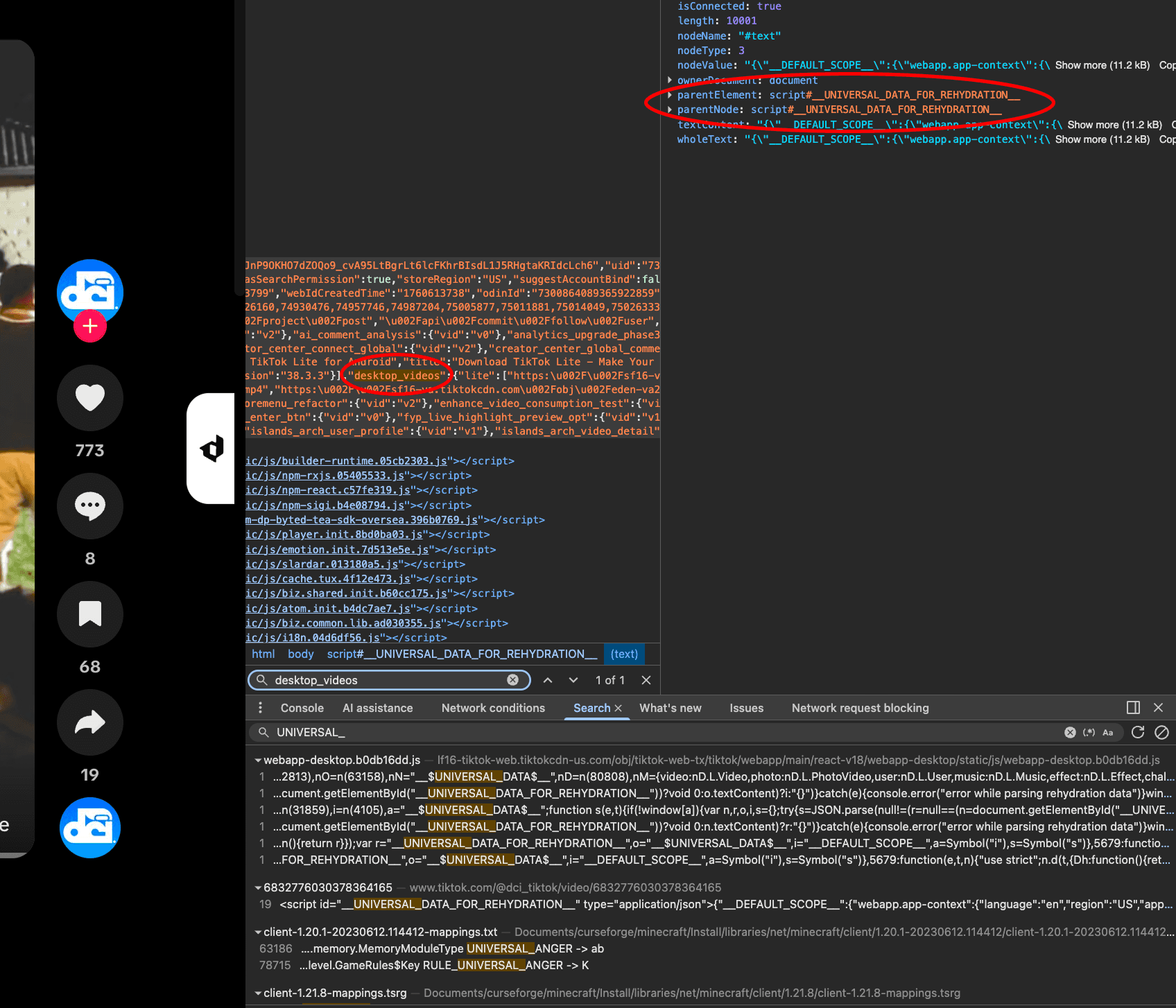
The video URL, author info, stats, all of it. Jackpot.
1<script id="__UNIVERSAL_DATA_FOR_REHYDRATION__" type="application/json">2 {3 "__DEFAULT_SCOPE__": {4 "webapp.video-detail": {5 "itemInfo": {6 "itemStruct": {7 "video": { "playAddr": "https://..." },8 "author": { "uniqueId": "username" }9 }10 }11 }12 }13 }14</script>By extracting and parsing this JSON, we get direct access to playAddr (the raw MP4 URL) without having to execute JavaScript or deal with their API rate limits. And that's exactly what we're gonna do. 
How it works
First, collect cookies and set the user agent:
1let cookie = "";2
3function appendCookies(headers: Headers): void {4    const set = headers.getSetCookie();5    if (!set) return;6    for (const c of set) {7        cookie += `${c.name}=${c.value}; `;8    }9}10
11const UA = "Mozilla/5.0 (Windows NT 10.0; Win64; x64) AppleWebKit/537.36";
Resolve short links (like vt.tiktok.com/wutdafuc) to get the post ID:
1if (!postId && obj.shortLink) {2 const res = await fetch(`https://vt.tiktok.com/${obj.shortLink}`, {3 redirect: "manual",4 headers: { "user-agent": UA }5 });6 const html = await res.text();7 const match = html.match(/<a href="(https:\/\/[^"]+)"/);8 if (match) {9 const idMatch = match[1].match(/video\/(\d+)/);10 if (idMatch) postId = idMatch[1];11 }12}Extract the hydration data to get the video details (the "magic" when put together):
1const res = await fetch(`https://www.tiktok.com/@i/video/${postId}`, {2    headers: { "user-agent": UA, cookie }3});4appendCookies(res.headers);5const page = await res.text();6
7const scriptStart = '<script id="__UNIVERSAL_DATA_FOR_REHYDRATION__" type="application/json">';8const parts = page.split(scriptStart);9const json = parts[1].split("</script>")[0];10const data = JSON.parse(json);11
12const videoDetail = data.__DEFAULT_SCOPE__?.["webapp.video-detail"]?.itemInfo?.itemStruct;
I also handle different content types (video vs. image post):
1const isPhoto = videoDetail.imagePost?.images;2const playAddr = videoDetail.video?.playAddr;3
4if (playAddr && !isPhoto) {5    return {6        type: "video",7        url: playAddr,8        filename: `tiktok_${videoDetail.author.uniqueId}_${postId}.mp4`,9        cookie10    };11}12
13if (isPhoto) {14 const images = videoDetail.imagePost.images15 .map((img: ImageData, i: number) => ({16 url: img.imageURL.urlList[0],17 filename: `tiktok_${videoDetail.author.uniqueId}_img_${i + 1}.jpg`18 }));19 return { type: "image_post", images, audio: videoDetail.music?.playUrl, cookie };20}It's important to note that TikTok's media servers check the request's origin and cookies. Without them, it'll always resolve to a 403. The key is that the cookies from the page fetch simply just need to be forwarded to the video request.
Because then, by including cookies in the tunnel, we basically pretend to be a legitimate browser.
Twitch
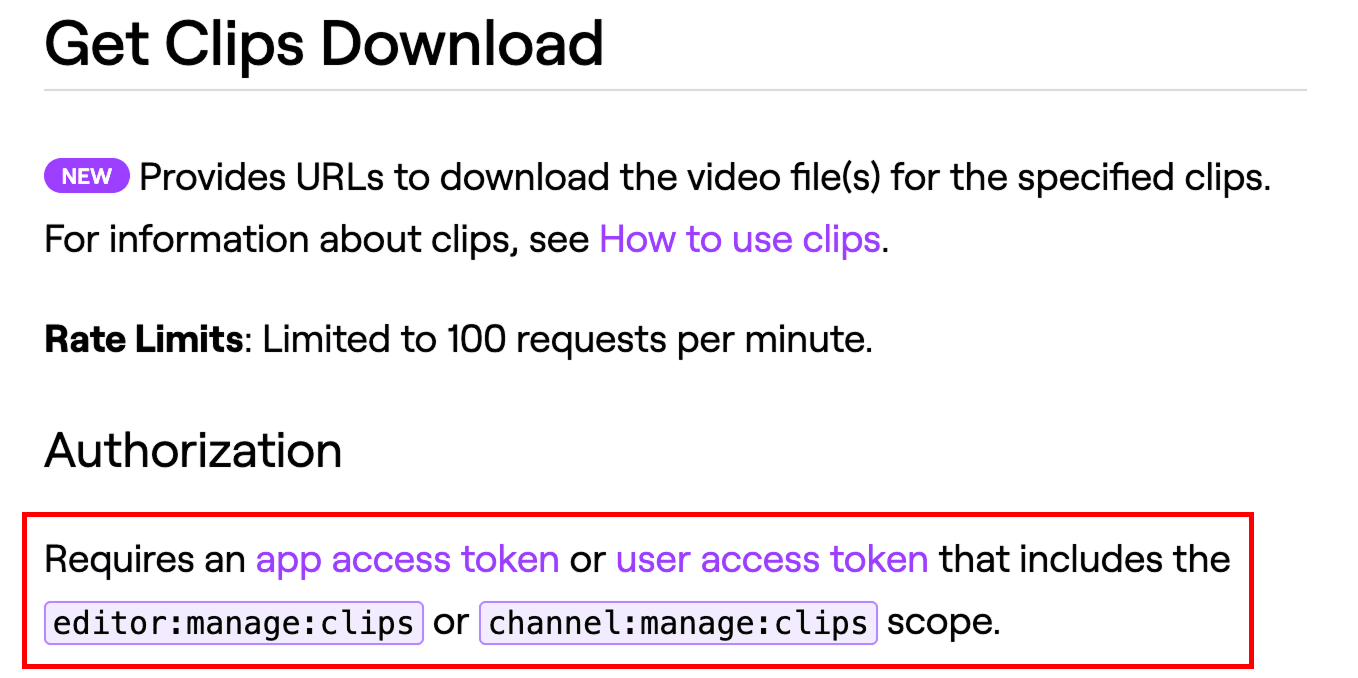
We see that behind authentication and permissions, Twitch's REST API actually does support downloading clips.
However, for unauthenticated users, their web player has to fetch clip data somehow, and that's all happening through GraphQL. I opened up devtools, loaded a clip, and watched the network tab to see what the player was actually requesting.
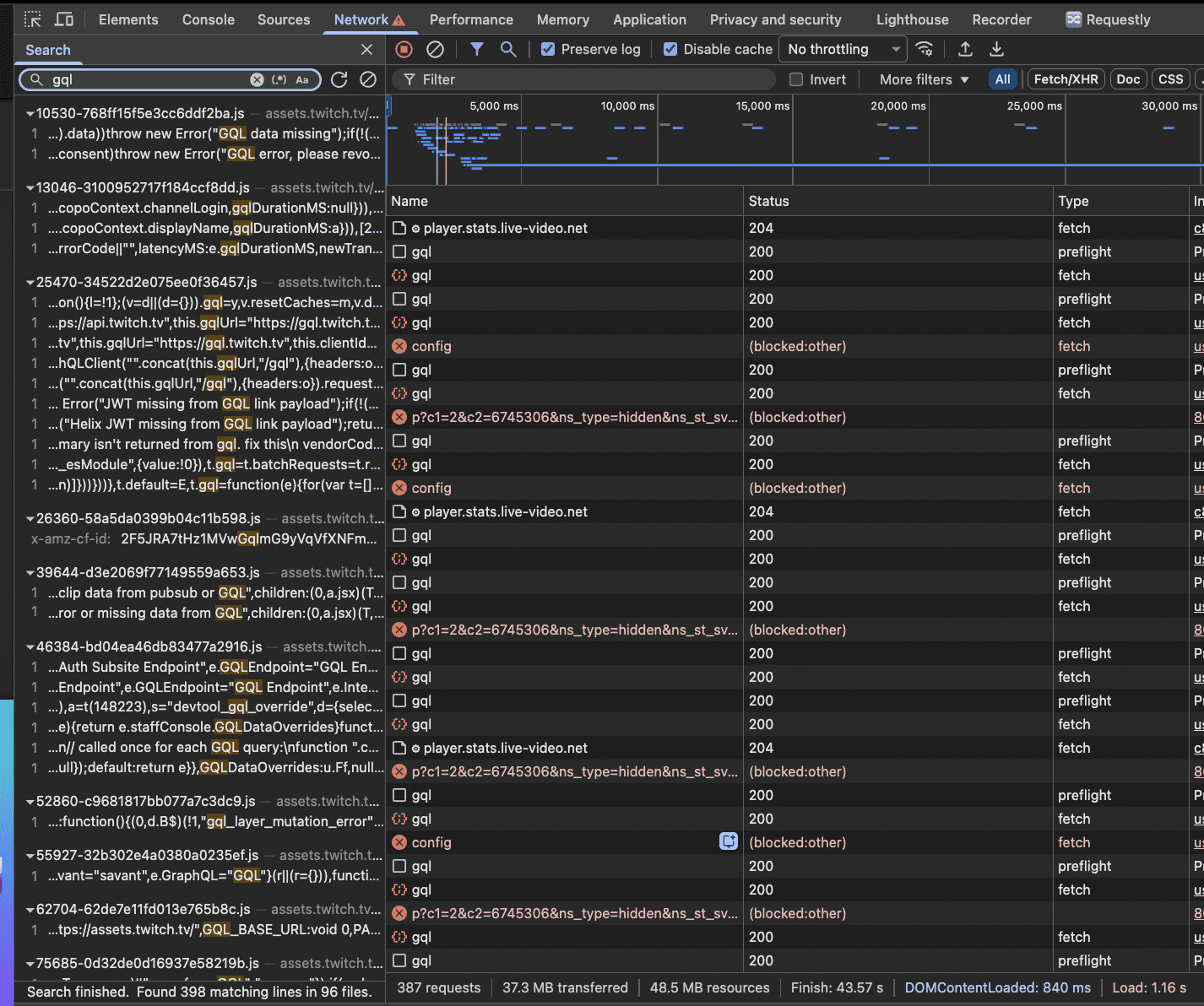
Turns out you need two things: the clip metadata (title, broadcaster, available qualities) and a playbackAccessToken that proves you're allowed to access that specific quality.
Interestingly, Twitch uses persisted queries for this. That works by instead of sending say the full GraphQL query string, they just send a SHA256 hash that identifies the query on the server2.
It's clever on their part (but not really) because it saves bandwidth and makes it slightly harder to reverse engineer, but the hash itself is just sitting there in the JavaScript bundle, so it's not really that hard to find if you know where to look.
Extraction
As always, set up the headers for the request (in this case, the GraphQL endpoint, and the client ID are unique to Twitch):
Note, the client ID you get here needs to be the same as the one used in the source, NOT the one you get by making a developer application. You can find it by opening up devtools, looking at the network tab, and looking for the client ID in the request headers of any request to the GraphQL endpoint.
1const twitchGraphQLURL = "https://gql.twitch.tv/gql";2const twitchClientId = "kimne78kx3ncx6brgo4mv6wki5h1ko";3
4const headers = {5    "Client-ID": twitchClientId,6    "Content-Type": "application/json",7    "User-Agent": "Mozilla/5.0 (Windows NT 10.0; Win64; x64) AppleWebKit/537.36",8};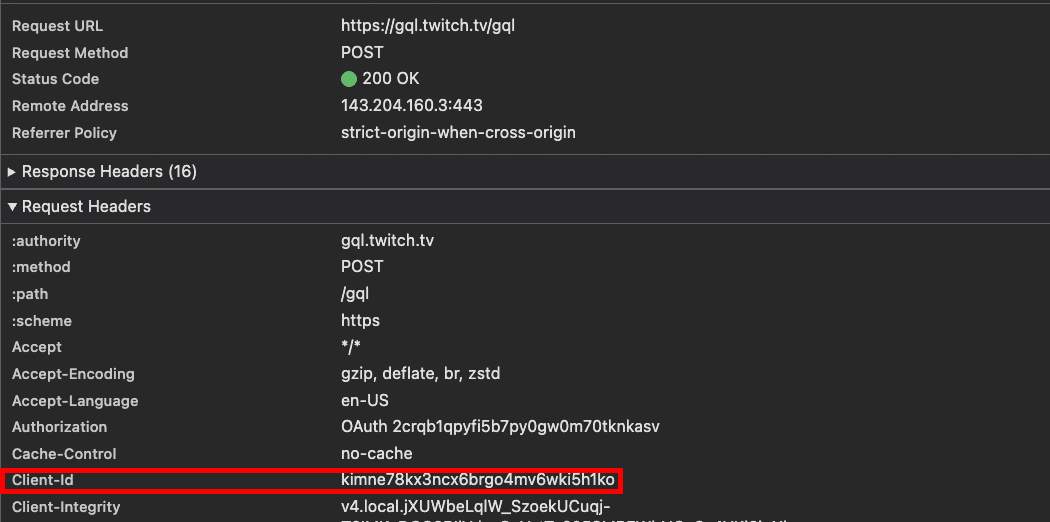
Then, get the metadata with a GraphQL query:
1const queryBody = {2    query: `{3        clip(slug: "${input.clipId}") {4            broadcaster { login }5            durationSeconds6            id7            title8            videoQualities { quality, sourceURL }9        }10    }`,11};12
13const metadataRes = await fetch(twitchGraphQLURL, {14    method: "POST",15    headers,16    body: JSON.stringify(queryBody),17});18
19const clip = (await metadataRes.json())?.data?.clip;
Fetch the access token using a persisted query2:
1const tokenRes = await fetch(twitchGraphQLURL, {2    method: "POST",3    headers,4    body: JSON.stringify([{5        operationName: "VideoAccessToken_Clip",6        variables: { slug: input.clipId },7        extensions: {8            persistedQuery: {9                version: 1,10                sha256Hash: "36b89d2507fce29e5ca551df756d27c1cfe079e2609642b4390aa4c35796eb11",11            },12        },13    }]),14});15
16const accessToken = (await tokenRes.json())[0]?.data?.clip?.playbackAccessToken;
Construct the final URL with the access token and its signature:
1const mediaUrl = `${selectedQuality.sourceURL}?${new URLSearchParams({2 sig: accessToken.signature,3 token: accessToken.value,4})}`;The SHA256 hash for the "VideoAccessToken_Clip" operation is probably the most fragile part of this whole thing. If Twitch decides to change their GraphQL schema or update the operation, this hash becomes basically useless. That said, these have been stable for years because changing them would break many downstream applications, including Twitch's own web player, and I doubt they want to deal with that in one go.
SoundCloud
SoundCloud's API needs a client_id parameter for basically every request. The annoying part? This ID isn't just sitting in a meta tag somewhere. It's buried in one of like thirty different script files, and they rotate it pretty frequently. Sometimes weekly, sometimes less.3
My first attempt was to hardcode the client ID and just update it manually when it broke. That lasted about three days before I got tired of it. So instead, I crawl the main page, find the current script version (which SoundCloud helpfully exposes in window.__sc_version) LMFAO, and then pattern match through their bundles looking for where they construct API URLs with the client ID. Then cache it until the version changes.
Client ID Discovery
1const cachedID = { version: '', id: '' };2
3async function findClientID(): Promise<string | null> {4    const sc = await fetch('https://soundcloud.com/').then(r => r.text());5    const versionMatch = sc.match(/<script>window\.__sc_version="([0-9]{10})"<\/script>/);6    const scVersion = versionMatch[1];7
8    if (cachedID.version === scVersion && cachedID.id) {9        return cachedID.id;10    }11
12    const scripts = sc.matchAll(/<script.+src="(.+?)">/g);13    let clientid;14
15    for (const script of scripts) {16        const url = script[1];17        if (!url.startsWith('https://a-v2.sndcdn.com/')) continue;18
19        const scrf = await fetch(url).then(r => r.text());20        const idMatch = scrf.match(/\("client_id=([A-Za-z0-9]{32})"\)/);21        if (idMatch[1]) {22            clientid = idMatch[1];23            break;24        }25    }26
27    if (clientid) {28        cachedID.version = scVersion;29        cachedID.id = clientid;30    }31
32    return clientid;33}
Track Resolution
Query SoundCloud's API to get the track details:
1const resolveURL = new URL("https://api-v2.soundcloud.com/resolve");2resolveURL.searchParams.set("url", link);3resolveURL.searchParams.set("client_id", clientId);4
5const json = await fetch(resolveURL).then(r => r.json());
I do this to handle various content restrictions on SoundCloud:
1if (json.duration > durationLimit * 1000) {2    return { error: "content.too_long" };3}4
5if (json.policy === "BLOCK") {6    return { error: "content.region" };7}8
9if (json.policy === "SNIP") {10    return { error: "content.paid" };11}
Then, fetch the actual stream URL:
1const fileUrl = new URL(selectedStream.url);2fileUrl.searchParams.set("client_id", clientId);3if (json.track_authorization) {4    fileUrl.searchParams.set("track_authorization", json.track_authorization);5}6
7const file = await fetch(fileUrl)8    .then(async r => {9        const data = await r.json();10        return data.url ? new URL(data.url) : null;11    });
NyumatFlix
As we know, NyumatFlix allows you to stream movies and TV shows. However, up until now, all of the streaming was done through provider iframes embedded in the page. That gave me something playable, but it did not give me much of a streaming service.
-
NyumatFlix couldn't own the playback state
The iframe was basically a black box. Unless the provider offered watch progress, auto advance, or playback events, NyumatFlix had no idea what the user was doing inside it. I couldn't reliably remember where someone stopped, move them to the next episode, or build the kind of continuity you'd expect from an actual streaming service.
-
Provider failures were invisible until playback
NyumatFlix could embed a provider, but it could not inspect what was available behind that embed. A movie might disappear, an episode might point to the wrong file, or the player might stop loading entirely. Usually, I wouldn't know until someone pressed play and got a broken iframe. Even when a provider exposed an API, NyumatFlix was still trusting whatever it returned without validating the stream itself.
-
The provider's experience became NyumatFlix's experience
Whatever the iframe did, my users had to deal with. That meant the provider's ads, slow loading times, buffering, popups, and player controls all became part of NyumatFlix. You're showing your parents the site, then boom, pornographic popup. No one wants that.
Embedding a video was enough to make NyumatFlix playable, but not enough to make playback reliable, stateful, or mine to control.
So what's the solution?
Stop embedding the provider's player and scrape the stream behind it.
The input is intentionally boring: a media type, a TMDB ID, and season or episode coordinates when needed. Every provider has to turn that into the same discriminated result. The real contract in lib/scrape/types.ts looks like this:
1type ScrapeMediaInput = {2    mediaType: "movie" | "tv";3    tmdbId: number;4    seasonNumber?: number;5    episodeNumber?: number;6};7
8type ScrapeResult =9    | {10        ok: true;11        providerId: string;12        streamUrl: string;13        referer?: string;14        subtitles?: ScrapeSubtitle[];15        playbackRefresh?: ScrapePlaybackRefresh;16      }17    | {18        ok: false;19        providerId: string;20        error: string;21      };
That boundary matters more than pretending every site works the same way. One adapter might call a source API. Another might crawl through two embeds, recover a hash, and exchange it for a short-lived token. The dispatcher in lib/scrape/index.ts does not care. It calls the typed adapter, validates what comes back, probes the actual playback path, then moves to the next provider on failure.
1const SCRAPERS: Record<2    ScrapeProviderId,3    (input: ScrapeMediaInput) => Promise<ScrapeResult>4> = {5    vidking: scrapeVidKing,6    vidnest: scrapeVidNest,7    vidsrc: scrapeVidSrc,8    "2embed": scrapeXPass,9    vixsrc: scrapeVixsrc,10    vidrock: scrapeVidrock,11    bingr: scrapeBingr,12};13
14for (const providerId of providerIds) {15    const result = await scrapeProvider(providerId, input);16    if (result.ok) return result;17}
The provider order is not cosmetic either. It lives in a single capability registry, alongside whether each provider supports an iframe, TMDB scraping, anime scraping, or anime embeds.
Finding a URL is not success
A URL that returns 200 can still lead to a dead child playlist, an expired segment token, or a CDN that rejects the player. So a successful adapter result goes through full stream validation and then a request against the same /api/scrape/play path the browser will use. NyumatFlix only hands the source to the player after both layers agree.
1const validation = await validateStreamUrlWithReferers(2    streamUrlForValidation,3    providerReferer,4    streamKind,5    { depth: "full" },6);7
8if (!validation.ok) {9    return { ok: false, providerId, error: "Stream URL failed validation" };10}11
12const playProbeOk = await probeScrapePlaybackPath(13    { url: next.streamUrl, referer: next.referer, refresh: next.playbackRefresh },14    streamKind,15);
This is the full request path, including what happens after the first manifest loads:
Owning the whole playback graph
Finding the master URL is only half the problem. An HLS playlist can reference child playlists, segments, keys, and subtitles. A DASH MPD can hide URLs in BaseURL, media, initialization, and template attributes. If I proxy only the first file, the browser leaves NyumatFlix on its very next request.
The manifest rewriter resolves every relative HLS media line and wraps it in another NyumatFlix playback URL. It separately rewrites URI attributes because encryption keys and alternate tracks often live there instead of on normal media lines.
1export const rewriteManifestPlaylist = (2    content,3    manifestUrl,4    referer,5    refresh,6    proxyBaseUrl,7) =>8    content9        .split(/\r?\n/)10        .map((line) => {11            if (line.trimStart().startsWith("#")) {12                return rewritePlaylistUriAttributes(13                    line,14                    manifestUrl,15                    referer,16                    refresh,17                );18            }19
20            const rawResolved = resolvePlaylistLine(line, manifestUrl);21            const resolved =22                rawResolved && refresh?.providerId === "vidking"23                    ? normalizeVidKingAssetHost(rawResolved, manifestUrl)24                    : rawResolved;25            if (!resolved) return line;26
27            return absolutizePlayUrl(28                buildScrapePlayUrl({ url: resolved, referer, refresh }),29                proxyBaseUrl,30            );31        })32        .join("\n");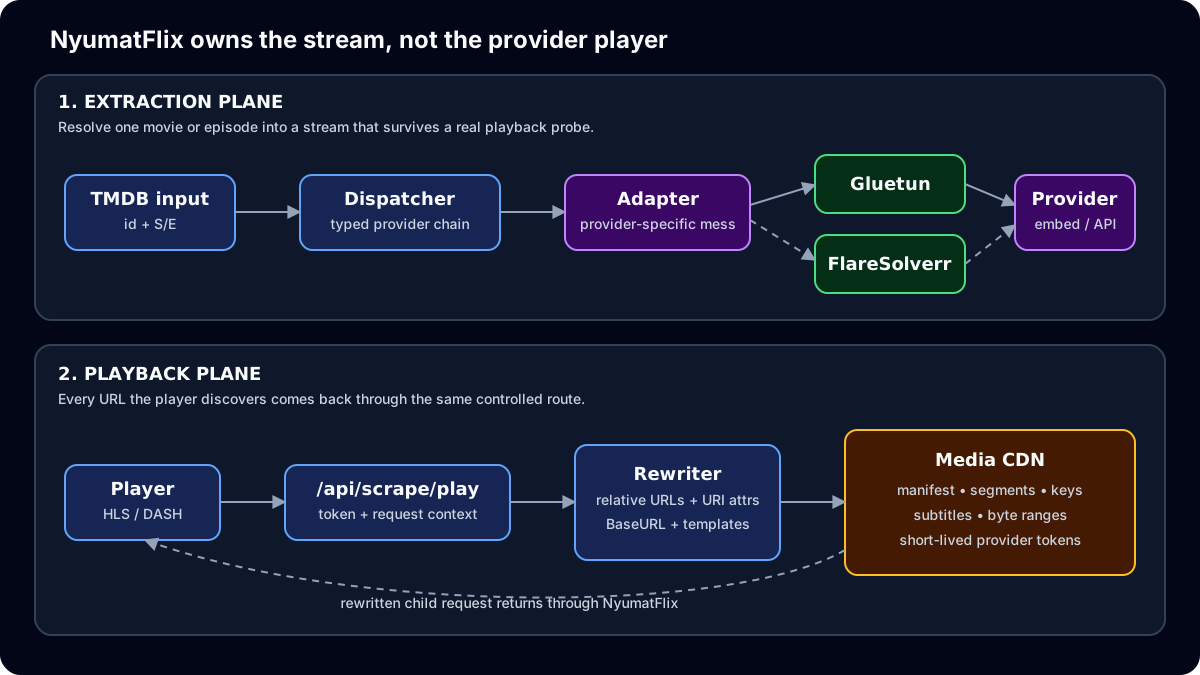
The playback route also forwards the browser's Range header and returns Content-Length, Content-Range, and Accept-Ranges. That is what keeps seeking functional according to normal HTTP range request behavior. Segment bodies stay as upstream.body, so the route does not load an entire movie into memory first.
1const rangeHeader = request.headers.get("range");2const upstream = await fetchUpstream(3    upstreamUrl,4    playback.referer,5    rangeHeader,6    upstreamSignal,7    playback.cookies,8);9
10for (const key of ["content-length", "content-range", "accept-ranges"]) {11    const value = upstream.headers.get(key);12    if (value) headers.set(key, value);13}
Short-lived provider credentials make this route more than a dumb proxy. When VidKing, VidSrc, VixSrc, or Megaplay rejects an old source, the route invalidates that provider's cached session, resolves a fresh upstream URL, and retries. The DASH tests also prove that $RepresentationID$ and $Number%08d$ templates survive rewriting without accepting unsafe substitutions. Both behaviors are visible in the route and stream-kind tests.
Two proxies, two different jobs
The playback proxy controls how the browser reaches media. The outbound scrape proxy controls how NyumatFlix reaches a provider. Combining them would send unrelated TMDB, auth, and database traffic through the VPN for no reason.
For normal provider requests, lib/scrape/proxy.ts creates a shared Undici ProxyAgent only when SCRAPE_PROXY_URL exists. Providers that need a browser challenge can use FlareSolverr. NyumatFlix pools that browser session for five minutes instead of paying the challenge cost on every scrape, as shown in the FlareSolverr wrapper.
In production, Gluetun exposes its HTTP proxy on the private Docker network. The actual Compose file grants only the VPN container NET_ADMIN, while the production reconciler writes SCRAPE_PROXY_URL=http://gluetun:8888 into the app configuration and waits for the tunnel to become healthy.
That split is the whole system in one sentence: provider adapters turn a title into a stream I have actually tested, then the playback proxy makes every request needed to keep that stream alive look consistent to the player.
The Tunnel
When someone accesses the tunnel URL, the server must:
- Decrypt and verify the payload
- Fetch from the original platform with the correct headers
- Stream the response back without loading everything into memory first
This is why it's called a "tunnel".
How
Validate and decrypt the payload to verify its authenticity:
1const { id, sig, iv, sec, range } = query;2
3if (!id || !sig || !iv || !sec) {4    set.status = 400;5    return { error: "Missing required parameters" };6}7
8const streamData = await streamManager.verifyAndDecrypt(9    id as string,10    sig as string,11    exp,12    iv as string,13    sec as string,14);
Handle range requests for video seeking (so clients can seek to a specific time in the video):
1const clientRange = typeof range === "string" && range.length > 02 ? range3 : incomingRequest.headers.get("range") || "bytes=0-";Proxy the request to the original platform:
1const { body, headers, statusCode } = await request(streamData.urls, {2 headers: {3 "User-Agent": "Mozilla/5.0 (Windows NT 10.0; Win64; x64) AppleWebKit/537.36",4 Cookie: streamData.headers.cookie,5 Referer: originalUrl,6 Range: clientRange,7 },8});Determine content type and build the response:
1let contentType: string;2if (streamData.type === "audio_only") {3    if (streamData.service === "soundcloud") {4        contentType = streamData.isHLS ? "application/vnd.apple.mpegurl"5            : streamData.bestAudio === "mp3" ? "audio/mpeg" : "audio/opus";6    } else {7        contentType = "audio/m4a";8    }9} else {10    contentType = "video/mp4";11}12
13const responseHeaders: Record<string, string> = {14    "Content-Type": contentType,15    "Content-Disposition": `inline; filename="${streamData.filename}"`,16    "Accept-Ranges": "bytes",17};18
19return new Response(body as ReadableStream<Uint8Array>, {20    status: statusCode,21    headers: responseHeaders,22});
The key thing here is streaming. We don't load the entire video into memory. That would be a disaster for a 500MB file. Instead, tom.christmas opens a stream from the selected source and pipes it directly back to the client. This was one of those things that seemed obvious in hindsight but took me a while to get right. The first version buffered everything and the server just died silently whenever someone tried to download a long clip.
Exposing this through a Discord bot
At the end of building the MVP with the original TikTok source, I decided to add a Discord bot to the mix. It's a lot more accessible this way. The bot simply sits on top of this entire system by exposing the tom.christmas APIs through Discord's application layer.
Here's a flowchart overview of how the Discord bot processes messages:
Extracting URLs
I use simple regex to extract URLs from the message content. It's honestly nothing fancy, just a few patterns to match the different URL types.
1const extractCandidates = (content: string) => {2    const tiktok = new Set<string>();3    const soundcloud = new Set<string>();4    const twitch = new Set<string>();5
6    const directUrls = content.match(/https?:\/\/[^\s<>()\[\]]+/gi) ?? [];7    const extraTikTok = content.match(/(?:www\.)?(?:vt|vm)?\.?tiktok\.com\/\S+/gi) ?? [];8    const extraSoundCloud = content.match(/(?:www\.)?soundcloud\.com\/\S+|on\.soundcloud\.com\/\S+/gi) ?? [];9    const extraTwitch = content.match(/(?:www\.)?(?:clips\.)?twitch\.tv\/\S+/gi) ?? [];10
11    const candidates = [...directUrls, ...extraTikTok, ...extraSoundCloud, ...extraTwitch];12
13    for (const raw of candidates) {14        const normalized = normalizeCandidate(raw);15        try {16            const url = new URL(normalized);17            if (TIKTOK_HOSTS.has(url.hostname)) tiktok.add(normalized);18            else if (SOUNDCLOUD_HOSTS.has(url.hostname)) soundcloud.add(normalized);19            else if (TWITCH_HOSTS.has(url.hostname)) twitch.add(normalized);20        } catch { continue; }21    }22
23    return { tiktok: [...tiktok], soundcloud: [...soundcloud], twitch: [...twitch] };24};
Re-encode we must
Discord has strict file size limits depending on the server boost level. A 1080p Twitch clip at 60fps definitely exceeds the limit. The bot handles such cases by re-encoding using FFmpeg, on the server, before sending it to the client:
1const reencodeVideo = async (buffer: Buffer, filename: string) => {2    const tempDir = await fs.mkdtemp(join(tmpdir(), "get-tt-"));3    const inputName = join(tempDir, `input_${filename.replace(/[\\/]/g, "_")}`);4    const outputName = join(tempDir, "output.mp4");5
6    await fs.writeFile(inputName, buffer);7
8    await new Promise<void>((resolve, reject) => {9        ffmpeg()10            .input(inputName)11            .outputOptions([12                "-c:v libx264",13                "-preset veryfast",14                "-crf 30",15                "-maxrate 900k",16                "-bufsize 1800k",17                "-vf scale=min(854\\,iw):-2",18                "-c:a aac",19                "-b:a 96k",20                "-movflags +faststart",21            ])22            .on("end", resolve)23            .on("error", reject)24            .save(outputName);25    });26
27    const outputBuffer = await fs.readFile(outputName);28    await fs.rm(tempDir, { recursive: true, force: true });29    return outputBuffer.length > 0 ? outputBuffer : null;30};
The FFmpeg options here took some time to get just right. veryfast preset because nobody wants to wait five minutes for a video to load, crf 30 which is honestly on the low-quality side but keeps file sizes reasonable, and cap the bitrate at 900k to make absolutely sure I stay under Discord's limits. The scale filter downscales to around 480p width while preserving aspect ratio, which looks fine on mobile where most people are on Discord anyway.
Sending to Discord
Finally, I send the attachment to the channel.
1const sendAttachment = async (tunnel: string, data: ExtractResponse, message: Message) => {2    const response = await fetch(tunnel);3    if (!response.ok) return;4
5    let buffer = Buffer.from(await response.arrayBuffer());6    let filename = getFilename(data, response.headers.get("content-type"));7
8    if (response.headers.get("content-type")?.includes("video/")9        && buffer.length > DISCORD_MAX_UPLOAD_BYTES) {10        const reencoded = await reencodeVideo(buffer, filename);11        if (reencoded) {12            buffer = reencoded;13            filename = getCompressedFilename(filename);14        }15    }16
17    const attachment = new AttachmentBuilder(buffer, { name: filename });18    try {19        await message.reply({ files: [attachment] });20    } catch {21        await message.channel.send({ files: [attachment] });22    }23};
Deploying
The system runs on Bun with ElysiaJS.
The architecture is a pretty simple one, with the API and the web frontend being served from the same Elysia instance.
I use Bun's native streaming API so responses do not buffer entire media files in memory, and Elysia handles routing and static files. Bun's streams documentation shows the Response-based file path used here.
1app.listen(2 { port: env.PORT, hostname: env.HOSTNAME },3 (server) => {4 console.log(`Elysia started at ${server.url}`);5 },6);The application is deployed to Railway using their Docker BuildKit. After setting up the application, I wrote a Dockerfile to essentially bundle everything together and run in a container. The bot is an executable built with Bun, and the server is a regular Bun application, serving the static client files and API.
1FROM oven/bun:1.2.15 AS builder2WORKDIR /app3COPY bun.lock package.json turbo.json biome.json bunfig.toml ./4COPY client/package.json client/biome.json client/tsconfig*.json client/components.json ./client/5COPY server/package.json server/biome.json server/tsconfig.json ./server/6COPY bot/package.json bot/tsconfig.json ./bot/7RUN bun install --frozen-lockfile8COPY client/index.html client/vite.config.ts ./client/9COPY client/src ./client/src10COPY client/public ./client/public11COPY server/src ./server/src12COPY bot/index.ts ./bot/13RUN bun run --cwd client build14RUN bun build --compile --target=bun-linux-x64 --minify ./bot/index.ts --outfile ./bot/bot15FROM oven/bun:1.2.15-slim AS runner16WORKDIR /app17ENV NODE_ENV=production \18 PORT=3000 \19 HOSTNAME=0.0.0.020COPY /ffmpeg /usr/bin/ffmpeg21COPY /ffprobe /usr/bin/ffprobe22RUN chmod +x /usr/bin/ffmpeg /usr/bin/ffprobe23COPY /app/bun.lock /app/package.json /app/turbo.json ./24COPY /app/node_modules ./node_modules25COPY /app/server ./server26COPY /app/client/dist ./client/dist27COPY /app/bot/bot ./bot/bot28RUN chmod +x ./bot/bot29EXPOSE 300030CMD ["sh", "-c", "./bot/bot & bun server/src/index.ts"]What's Next?
Pretty much just scaling the sources to more platforms! Instagram Reels would be nice but their obfuscation and security is tighter. I want to add better HLS / MP4 handling for platforms that use adaptive streaming. I'd also like to use a non-native audio player.
Maybe metadata enrichment too so I actually pull full artist and producer info in SoundCloud's case. But honestly, this already does what I need it to do, so these are all "if I get bored again" additions.
Tbh, this christmas project ended up being A LOT more interesting than I expected. I was telling my friend Devine this the other day, when people ask me "Why do you love frontend so much?" I tell them that this exact ubiquity of frontend is what makes it so interesting.
And for people out there reading this and struggling to ship their own project(s):
This project did not solve a new problem. It gave me one small service that fit my workflows and forced me to learn how each source actually delivers media.
The stack
Footnotes
-
The
__UNIVERSAL_DATA_FOR_REHYDRATION__script is a pattern used by many server-side rendered apps (Next.js, Nuxt, etc.) to avoid duplicate API calls. It's meant for the browser's hydration process but is trivially accessible via parsing. ↩ -
Twitch's persisted query hash system is documented in their GraphQL explorer. The specific hash for
VideoAccessToken_Cliphas been stable for years, suggesting it's a core operation unlikely to change soon. ↩ ↩2 -
SoundCloud's client ID rotation is the platform's way of limiting third party API usage. However, the client ID is embedded in publicly served JavaScript, making it discoverable and cacheable. ↩